73 KiB
Raw 12-bit capture with on-tower colour conversion: measurements on the LattePanda IOTA and 3 Delta
Fire-watch tower camera system — technical report, October 2026
Abstract
The towers' camera currently delivers 8-bit colour images (RGB8), converted to colour inside the
camera. This study tested whether the camera should instead deliver its raw 12-bit sensor data
(BayerRG12p), with the tower's computer converting it to colour and saving 12-bit JPEG XL. The
same camera (Allied Vision Alvium 1800 U-1620c, 16.2 MP) was measured on both tower computers, the
LattePanda IOTA (tower 121) and the LattePanda 3 Delta (tower 111). Frame rate, auto-exposure and
auto-white-balance settling, the duration of every processing step, file sizes, CPU temperature and
power were recorded, and the processing was repeated on one identical image on both computers.
Raw 12-bit doubles the camera's frame rate over the same USB link (9.86 fps against 4.95 fps), so auto-exposure settles in about 60% of the time, with no lost frames on either tower. Converting to colour on the tower costs 38–50 ms; the JPEG XL encode dominates, and the complete 12-bit save takes slightly less time than today's RGB8 save (0.52 s on the IOTA, 0.82 s on the Delta, which is 1.6× slower). At a realistic scan pace both computers keep up and stay cool (53 °C and 66 °C); the Delta needs two save workers to match the IOTA's single one. A 12-bit colour file at quality setting (distance) 1.0 is 2.7 MB, smaller than today's 3.3–4.0 MB. A rule for when to keep a frame (brightness in the camera's target band and steady for 3 frames) selected a good frame in 21 of 24 tests; waiting for exposure and gain to stop changing never did.
The extra bits themselves add less than expected. In the daylight scene measured, the sensor's own noise was 6–17 times larger than the error from rounding to 8 bits, which raised the total noise by at most 1.5%; and JPEG XL compression at distance 1.0 adds about 13 times more error than that rounding. A dark, high-contrast scene from the Stäffelsberg tower (shaded forest under a hazy sky) was measured as well: there the noise in the dark third of the frame is below one 8-bit step, and rounding to 8 bits raises it by 10–26%, but averaged over an area the 8-bit values still keep the local brightness to 0.6 DN (12-bit scale). The larger difference comes from the encoder: saved at distance 1.0, an 8-bit file breaks the shaded forest into flat blocks and keeps its local brightness 2.3 times less accurately than a 12-bit file, and today's RGB8 file shows the same blocks at the same size as the 12-bit file. The same 8-bit values saved as a 12-bit file behave almost like 12-bit data, so the gain comes mostly from the file's declared bit depth, not from the four extra bits. The 12-bit format costs little against 8-bit raw (about 10% more processing time; the same file size in daylight, 46% larger in the dark scene), but the camera runs at 9.86 instead of 14.75 fps.
Units and abbreviations
Units, symbols and abbreviations used in this report.
| Symbol | Meaning |
|---|---|
| MB, GB, TB | 10⁶, 10⁹, 10¹² bytes |
| MB/s | 10⁶ bytes per second |
| fps | frames per second |
| ms, s | milliseconds, seconds |
| dB | decibel (camera gain; image quality PSNR) |
| DN | digital number: a pixel value, on a 0–255 scale (8-bit) or 0–4095 (12-bit) as stated |
| °C, W, GHz | CPU package temperature, package power, average core clock |
| MP | megapixels (10⁶ pixels) |
| d, e | JPEG XL distance (quality: 0 = lossless, higher = smaller and lossier) and effort (1–9) |
| PSNR | peak signal-to-noise ratio, in dB |
| SSIM | structural similarity index, 0–1 (1 = identical) [6] |
| stop | a factor of 2 in light or brightness: brightened by 2 stops = pixel values ×4; ×16 = 4 stops |
| IOTA, Delta | LattePanda IOTA (tower 121) and LattePanda 3 Delta (tower 111) |
1. Introduction
1.1 Background and question
Each tower scans a set of waypoints and keeps one picture per waypoint. After the gimbal stops, the camera's auto-exposure needs a number of frames to adapt to the new view, so the scan waits; and each kept picture is compressed to JPEG XL [2] on the tower. Today the camera converts its sensor data to 8-bit colour (RGB8) itself. That format is three times larger than the raw sensor data, which limits the frame rate over the camera's USB link and thereby lengthens the exposure settling.
This report answers: should the towers take raw 12-bit data from the camera instead, and convert it to colour on the tower? Specifically: (1) how much faster is the camera, and does exposure settle faster; (2) how long does each processing step take on each tower computer; (3) how large are the files; (4) can both computers keep up without piling up images or overheating; and (5) what do the extra bits add.
1.2 The camera's pixel formats
The sensor sees through a colour-filter mosaic: each pixel measures only red, green or blue, in the pattern of Figure 1a ("BayerRG": a red pixel first). Producing a colour image means estimating the two missing colours at every pixel from its neighbours, called de-Bayering (demosaicing). The camera can either send the raw mosaic or de-Bayer it itself.
R G R G R G ...
G B G B G B ...
R G R G R G ...
Figure 1a. The BayerRG colour-filter pattern of the sensor: each pixel records one colour.
Table 1. Pixel formats considered, at the 1620c's full resolution (5328 × 3040 pixels) and a USB link cap of 250 MB/s [4]. Bits per value: the precision of each stored measurement (8 bits = 256 levels, 10 bits = 1024, 12 bits = 4096). Packed: values stored back to back without padding bits. Maximum rate: the highest frame rate the camera accepts at this link cap.
| Format | What the camera sends | Bits per value | Bytes per pixel | Frame size (MB) | Maximum rate (fps) | Colour made by |
|---|---|---|---|---|---|---|
RGB8 (today) |
three values per pixel, two of them estimated | 8 | 3 | 48.6 | 4.95 | the camera |
BayerRG8 |
the raw mosaic, top 8 of the sensor's 12 bits | 8 | 1 | 16.2 | 14.75 | the tower |
BayerRG10p |
the raw mosaic, 10 bits, packed (4 pixels in 5 bytes) | 10 | 1.25 | 20.2 | 11.81 | the tower |
BayerRG12p (proposed) |
the raw mosaic, all 12 bits, packed (2 pixels in 3 bytes) | 12 | 1.5 | 24.3 | 9.86 | the tower |
BayerRG12 |
the same 12 bits, each in a 16-bit word (4 bits of padding) | 12 | 2 | 32.4 | 7.41 | the tower |
RGB8 is the largest because two of its three values per pixel are estimates; it carries no more
measured information than BayerRG8. BayerRG12p and BayerRG12 hold identical data; packing saves
25% of the bytes and so allows 33% more frames. The camera applies its white balance to the raw
formats too, so the tower does not need to. The camera also offers grey (Mono8/10/12, which
discards colour), BGR8 (RGB8 in reverse order) and video formats (YCbCr…, which reduce colour
detail); none of these was considered.
Saving raw data: mosaic and planes. Besides converting to colour, the tower can save the raw 12-bit data as received, each pixel keeping the single value measured through its filter. Two layouts were tested; they hold identical values and differ only in their arrangement in the file:
- Raw mosaic: the sensor data as the camera sends it, a single-channel (grey) image of 5328 × 3040 values still in the R G / G B pattern. Viewed directly it looks like a grey image with a fine checkerboard texture. Because colours alternate from pixel to pixel, the encoder sees the pattern as extremely fine detail: it compresses poorly (20.9 MB lossless), and lossy compression would mix values of different colours.
- Raw planes: the same values reordered into four quarter-size images (2664 × 1520 each), one per filter position (red, first green, second green, blue), tiled 2 × 2 into one grey image of the same total size (Figure 1b). Within each tile neighbouring values belong to the same colour and are similar, so the image is smooth to the encoder: 17.6 MB lossless, and lossy compression works (distance 0.5: 6.0 MB at a PSNR of 47.2 dB, against 38.8 dB for 12-bit colour of similar size; Section 3.7). The reordering is exactly reversible, so the mosaic can always be rebuilt.
Mosaic (5328 × 3040)            Planes (2 × 2 tiles of 2664 × 1520)
R G R G R G ...                 R R R ... | G G G ...
G B G B G B ...         →       R R R ... | G G G ...
R G R G R G ...                 ----------+----------
G B G B G B ...                 G G G ... | B B B ...
                                G G G ... | B B B ...
Figure 1b. Rearranging the raw mosaic into four single-colour planes.
Neither layout is a viewable colour picture: the reader must de-Bayer it, as the tower does before saving colour. Their value is that they preserve the measured sensor values, with nothing estimated and no colour processing applied, which matters only if the detection algorithms need exact sensor data. Lossless planes take about 6 times the storage of 12-bit colour at distance 1.0 (17.6 MB against 2.65 MB per frame), so they are an option (recommendation 6, Section 5) and are not part of the current implementation.
1.3 Earlier work
An earlier campaign (camera-capture-measurements.md) used blurred, dim indoor scenes and found that the camera link is stable at full resolution once the USB settings of known issue #19 are applied; its compression figures were not representative of real scenes. The implementation built on this report is described in raw12-pipeline-implementation-plan.md.
2. Materials and methods
2.1 Hardware and software
Table 2. Test systems. The same camera was moved from tower 121 to tower 111, so only the computer differs between the towers. Storage write speed: sequential writing to the built-in eMMC flash storage.
| Tower 121 | Tower 111 | |
|---|---|---|
| Computer | LattePanda IOTA: Intel N150, 4 cores, ≤ 3.6 GHz, 7 GB RAM | LattePanda 3 Delta: Intel Celeron N5105, 4 cores, ≤ 2.9 GHz, 7.6 GB RAM |
| Storage write speed (MB/s) | 218 (eMMC) | 76 (eMMC) |
| Libraries | libjxl 0.11.1 [2], OpenCV 4.10 [3] | libjxl 0.11.0, OpenCV 4.5.4 |
| Camera | Alvium 1800 U-1620c DEV_1AB22C0B7D4E [5], 5328 × 3040 pixels |
same camera |
| Link cap (MB/s) | 250 | 250 |
| Test dates and light | 2 Oct, 15:01–16:50, sun | 4 Oct, 16:19–18:19, sun, then evening |
The tower control program was stopped during every test (the camera accepts one program at a time,
and the CPU figures should have a single cause). Afterwards both cameras were returned to their
standard profile.
2.2 Scene
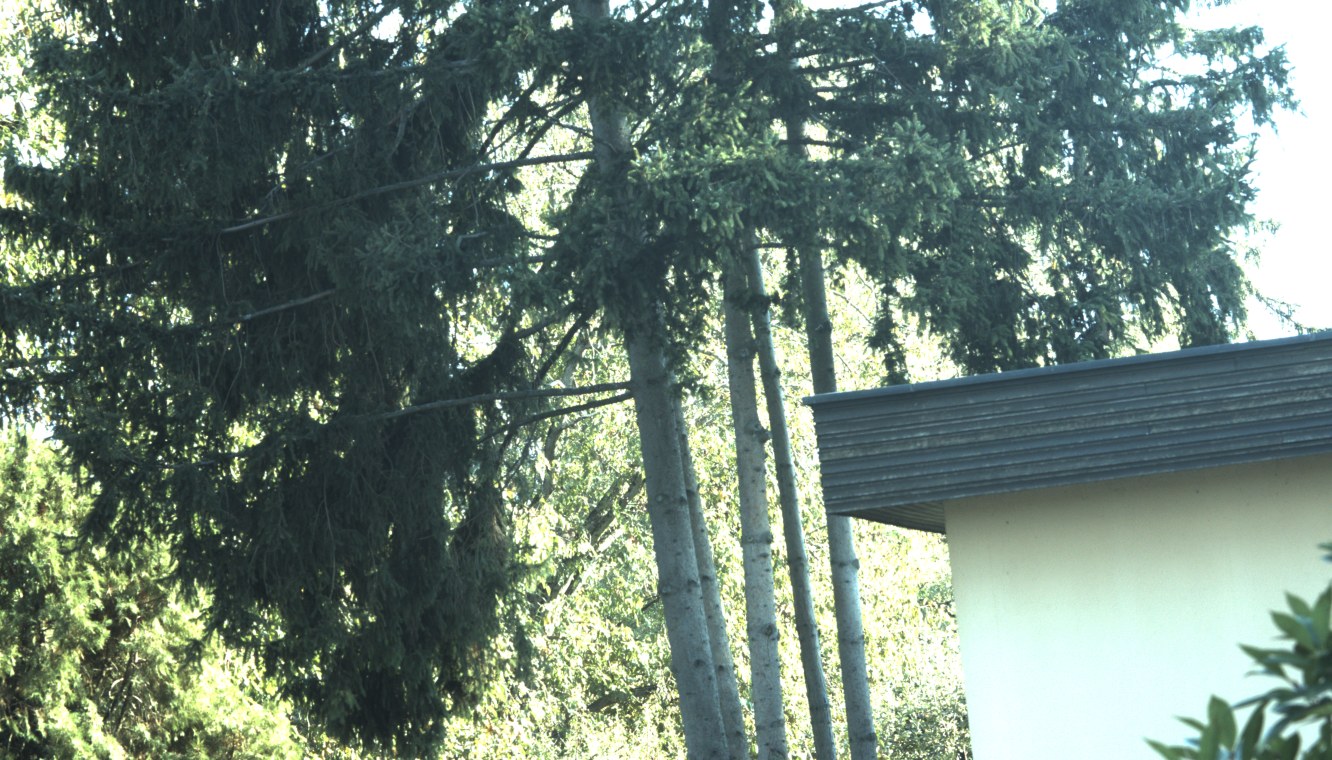
Figure 2. The test scene from tower 121's camera (2 Oct, 15:07; exposure 20 ms, gain ≈ 15 dB): spruce, birch trunks, leaves and a building. About 13% of the pixels are clipped sky: saturated at the maximum value, so they show pure white without detail.
2.3 Camera control
A Python program (camera_bench.py, Allied Vision vmbpy) drives the camera through the same GenICam
interface [4] the tower program uses. Each setting change is a GenICam feature write sent over the
USB control channel while the camera keeps streaming. ExposureAuto, GainAuto and
BalanceWhiteAuto take the values Off, Once or Continuous; setting one to Off freezes the
value the automatic control had reached, after which ExposureTime, Gain and BalanceRatio can be
written directly and take effect from the next frame exposed. No profile, user set or file on the
camera is changed.
Table 3. Camera settings common to all camera tests. Names in code font are the camera's GenICam features [4]. Chunk data: values the camera attaches to each frame, describing the settings it was taken with.
| Setting | Value | Reason |
|---|---|---|
| Resolution | 5328 × 3040 pixels, binning 1 | full resolution, as decided |
DeviceLinkThroughputLimit |
250 MB/s | agreed conservative link cap |
AcquisitionFrameRate |
the camera's maximum for the format (fps) | 9.86 (12-bit), 14.75 (8-bit raw), 4.95 (RGB8) |
ExposureAutoMax |
20 ms | as in the standard profile |
IntensityAutoPrecedence |
MinimizeNoise |
favours exposure over gain; with exposure at its 20 ms cap, the camera then uses gain |
IntensityControllerTarget / Tolerance / Rate |
50% / 5% / 100 | camera defaults; rate 100 is the fastest |
GainAutoMax |
≥ 43.5 dB (as left in the camera) | the bright steps reached 43.5 dB |
| Chunk data (per-frame metadata) | ExposureTime, Gain, BalanceRatioRed, BalanceRatioBlue, Timestamp |
each frame carries the settings it was exposed with |
| Buffers | 5 | as in production |
For every frame the program records the host arrival time, the camera's frame number, completeness,
the chunk data, and the frame's brightness (DN, 0–255) and clipped share (% of samples
≥ 250 DN), sampled from the image buffer: every 997th byte for RGB8 and 8-bit raw, and the high byte
of every 331st pixel pair for BayerRG12p, scaled to 0–255 DN.
2.4 Frame rate and streaming
For each format, the camera's maximum frame rate was read, then the camera streamed for 60 s at that
rate. Counted: frames received, incomplete frames (SDK frame status) and lost frames (gaps in the
camera's frame counter). BayerRG12p was streamed once more while the tower saved 12-bit images
continuously in parallel.
2.5 Auto-exposure step test
Table 4. The three phases of one auto-exposure step run. Exposure is the time the sensor collects light (ms); gain amplifies the sensor signal (dB; +6 dB doubles the brightness, +20 dB multiplies it by 10). A step of ×16 makes the image 16 times brighter (×1/16: 16 times darker), i.e. 4 stops, where one stop is a factor of 2.
| Phase | Duration (s) | Procedure |
|---|---|---|
| 1. Settle | 8 | ExposureAuto and GainAuto = Continuous. "Before" = median exposure and gain of the last 5 frames. The brightness the camera steers is E₀ = exposure × 10^(gain/20). |
| 2. Force | 2 | ExposureAuto = GainAuto = Off. Dark: ExposureTime = max(ExposureAutoMin, E₀/16), Gain = 0 dB. Bright: ExposureTime = min(20 ms, 16·E₀); the remainder as Gain = 20·log₁₀(16·E₀ / exposure) dB, up to GainAutoMax. The camera delivers 10–30 frames at the forced settings. |
| 3. Release | 15 | Time zero is taken, then ExposureAuto = GainAuto = Continuous; every frame is recorded. |
Table 5. Starting conditions of the auto-exposure steps: the first frame after release, ranges over all 24 runs. Before: the settled state before forcing. Dark / bright step: the settings forced 16 times darker / brighter. Brightness: mean pixel value on the 0–255 scale (DN). Clipped share: percentage of sampled pixels at or above 250 DN, i.e. saturated white without detail.
| Before (settled) | Start of "dark" step | Start of "bright" step | |
|---|---|---|---|
| Exposure (ms) | 20 (at its cap) | 7.4–11.5 | 20 |
| Gain (dB) | 15.4–19.5 | 0 | 39.6–43.5 (before + 24.1) |
| Brightness (DN, 0–255) | 117–122 | 9–13 (under-exposed) | 254–255 (over-exposed) |
| Clipped share (%) | 10–15 (sky) | 0 | 97–100 |
Settling was therefore measured from both under- and over-exposure. The bright start is fully saturated, so the camera cannot measure how far over it is and can only step down until detail reappears. Each format and direction was run twice: 12 runs per tower, 24 in total.
Settling time is judged on the image: the time from release after which brightness stays within ±10% of its final level (median over the run's last 2 s), and the number of frames this took. The first 1–5 frames after release still carry the forced values (frames in transit); they count towards the settling time.
2.6 Evaluation of keep rules
A keep rule decides which frame a waypoint keeps. Each candidate rule was applied offline to the 24 per-frame logs; for each, the first frame at which it would keep a picture was found, and counted as correct if that frame's brightness was within 10% of the final level, otherwise early. The camera's target band is 50 ± 5% of full scale, i.e. 114.8–140.3 DN on the 0–255 scale.
2.7 Auto white balance step test
Table 6. The four phases of one auto-white-balance step run. White-balance ratios are the gains the camera applies to the red and blue values relative to green (no unit; 1 = unchanged); ×0.5 halves them and ×2 doubles them.
| Phase | Duration (s) | Procedure |
|---|---|---|
| 1. Exposure | 6 | Auto-exposure settles; then ExposureAuto = GainAuto = Off with ExposureTime and Gain fixed at the median of the last 5 frames, so only white balance can change. BalanceWhiteAutoRate = 100 (fastest). |
| 2. Reference | 8 | BalanceWhiteAuto = Continuous. Reference = median red and blue ratios over the last 3 s (red 2.34–2.46, blue 1.86–1.97). |
| 3. Force | 2 | BalanceWhiteAuto = Off; red and blue BalanceRatio = reference × factor (green is the fixed reference). ×0.5: red ≈ 1.2, blue ≈ 0.95 (image too green); ×2: red ≈ 4.8, blue ≈ 3.8 (too magenta). |
| 4. Release | 15 | Time zero, then BalanceWhiteAuto = Continuous; every frame's ratios recorded. |
Settled = both ratios within ±5% of the reference and remaining there. Each case was run twice.
2.8 Processing tests
A C++ program (raw12_bench.cpp), built on each tower against its own libraries, performs the steps
the tower program would perform for one saved frame and times each with a monotonic clock.
Table 7. Processing steps timed for one saved frame. Bilinear conversion estimates each missing colour as the average of the nearest pixels of that colour; edge-aware conversion interpolates along edges rather than across them, giving fewer false colour fringes at a slightly higher cost. Distance and effort are the JPEG XL quality and speed settings (Units and abbreviations).
| Step | Operation |
|---|---|
| Unpack | BayerRG12p (two 12-bit pixels in three bytes) → one 16-bit word per pixel |
| Colour conversion | OpenCV cvtColor, bilinear (COLOR_BayerBG2RGB) or edge-aware (…_EA), 8- or 16-bit [3]; the camera's BayerRG corresponds to OpenCV's BayerBG (verified against the camera's RGB8) |
| JPEG XL encode | libjxl [2], into memory; effort and distance as stated; 12-bit input as 16-bit words with the bit depth taken from the file header; lossless with the original colour profile |
| File write | fopen/fwrite/fflush/fclose to the tower's eMMC |
Each time is the median of 3 runs (2 in the quality sweep). Before every run, the program verified that its 8-bit encoder produces byte-for-byte the file of the production encoder, that 12-bit lossless decodes exactly to the input, and that its colour order matches the camera's.
Input frames.
- Shared frame (identical on both towers; used for the tower comparison): tower 121's frame of 2 Oct (15:07, 20 ms, ≈ 15 dB), rebuilt bit-exactly from its lossless 12-bit file. Its 8-bit raw version is the 12-bit value shifted down by 4 bits; its "RGB8" version is the edge-aware colour conversion of the 12-bit frame, scaled to 8 bits (the camera's own RGB8 of that instant does not exist). Identical MD5 checksums on both towers.
- Synthetic frame (identical on both towers): a "dead leaves" texture [1] with added sensor noise; sharper than any real scene and therefore the worst case for the encoder.
- Each tower's own camera capture from its test day.
2.9 Image quality metrics
Every 12-bit result was decoded and compared with the exact lossless 12-bit colour image of the same frame (mosaic results first converted to colour in the same way): PSNR (dB) over all three channels on the 12-bit scale, and SSIM [6] on luma.
2.10 Throughput, pile-up and heat
Back to back: save workers process the same frame from memory continuously for 60 s. Paced: one frame is queued every 2.0, 1.5, 1.0, 0.7 or 0.5 s for 120 s, as a scan keeps one frame per waypoint; recorded are the time from queueing to file written, the frames still queued at the end ("behind") and the peak memory. Heat: 10 minutes back to back and 10 minutes at one frame every 2 s, each after a 5-minute cool-down; recorded once per second: CPU package temperature, average core clock, CPU busy share and package power (Intel RAPL energy counter [7]).
2.11 Noise measurement
Sensor noise was measured on the raw 12-bit values: the green sites were divided into 24 × 24-pixel patches; in each, noise σ = median absolute deviation of differences between horizontal neighbours, ÷ √2; patches were grouped by brightness, and the quietest 10% of each group taken as the noise floor (scene texture can only add to it). This was done for the ≈ 15 dB frame and for a frame taken at 0 dB gain (exposure 124 ms, 4 Oct 16:19, exposure cap temporarily raised to 200 ms).
2.12 Campaign log
Table 8. Campaign log: date and local time, tower, activity and duration (min) of each test session.
| Date and time | Tower | Activity | Duration (min) | Notes |
|---|---|---|---|---|
| 2 Oct 15:01–15:22 | 121 | camera tests | 21 | sunny |
| 2 Oct 15:22–16:50 | 121 | processing, pile-up, heat (own and synthetic frames) | 88 | |
| 2 Oct 19:01 | 121 | attempted 0 dB frame | – | too dark (24 dB needed); discarded |
| 4 Oct 16:19 | 111 | 0 dB frame (camera moved from 121) | 2 | |
| 4 Oct 16:20–16:41 | 111 | camera tests | 21 | tower 111's own camera connected but idle |
| 4 Oct 16:41–18:19 | 111 | processing, pile-up, heat | 98 | |
| 4 Oct 23:03–23:32 | 121 and 111 | processing on the shared frame, both towers simultaneously | 29 | no camera needed |
| 7 Oct, morning | Stäffelsberg | one BayerRG12p and one RGB8 frame of a dark, high-contrast view (Section 3.9.2) |
– | hazy; gain and exposure not recorded |
3. Results
3.1 Frame rate and streaming
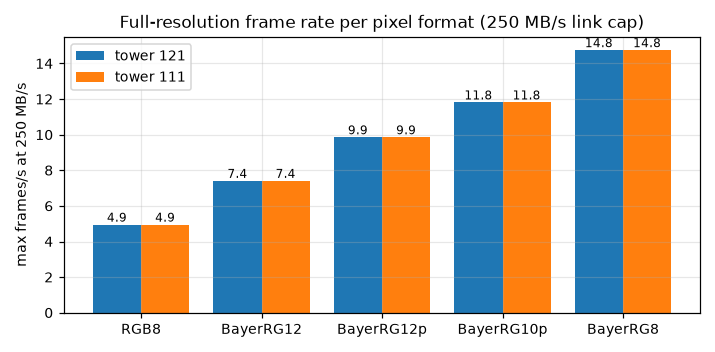
Figure 3. Maximum full-resolution frame rate (fps) per pixel format at the 250 MB/s link cap. The same camera was used on both towers.
Table 9. Results of 60 s streams at each format's maximum rate. Complete: frames received intact. Incomplete: frames whose data arrived only partly (SDK frame status). Lost: frames missing from the camera's frame counter. Last row: the same stream while the tower saved 12-bit images continuously in parallel.
| Format | Frame size (MB) | Maximum rate (fps) | 121: complete / incomplete / lost (frames) | 111: complete / incomplete / lost (frames) |
|---|---|---|---|---|
| BayerRG12p | 24.3 | 9.86 | 593 / 0 / 0 | 592 / 0 / 0 |
| BayerRG12 (unpacked) | 32.4 | 7.41 | 445 / 0 / 0 | 445 / 0 / 0 |
| BayerRG10p | 20.2 | 11.81 | 711 / 0 / 0 | 709 / 0 / 0 |
| BayerRG8 | 16.2 | 14.75 | 887 / 0 / 0 | 887 / 0 / 0 |
| RGB8 (today) | 48.6 | 4.95 | 298 / 0 / 0 | 297 / 0 / 0 |
| BayerRG12p while saving 12-bit continuously | 24.3 | 9.86 | 591 / 0 / 0 | 592 / 0 / 0 |
No frame was lost or incomplete in any format on either tower. On tower 111 the camera shares the USB 3 controller with a 5G modem, a USB network adapter and a second (idle) camera.
3.2 Auto-exposure settling
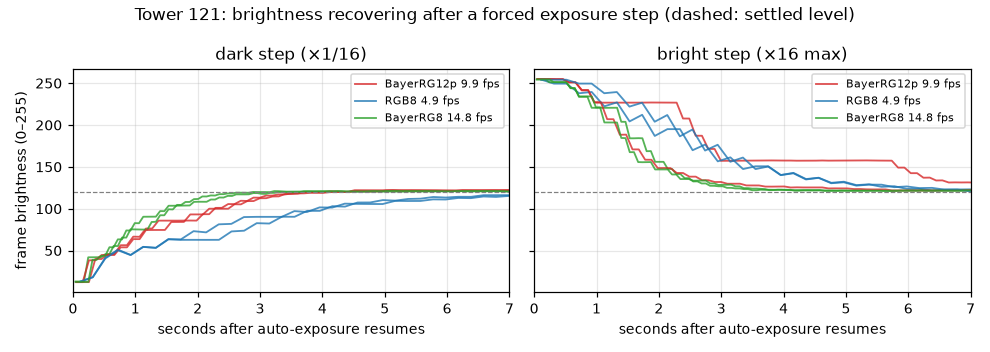
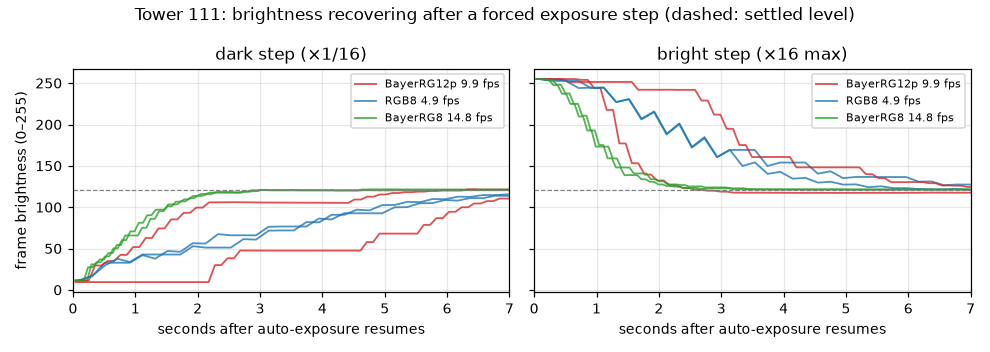
Figure 4. Frame brightness (DN, 0–255) against time (s) after auto-exposure is switched back on at time 0, for each format: (a, top) tower 121; (b, bottom) tower 111. Left: starting from under-exposure, 16 times (4 stops) too dark; right: from over-exposure, 16 times too bright. Dashed line: settled level, the median brightness over the run's last 2 s.
With exposure at its 20 ms cap, auto-exposure adjusts through gain, by 1–2 dB per frame, and sometimes pauses mid-way (flat segments in Figure 4, up to 2.8 s while still far too bright).
Table 10. Settling time after a forced exposure step: time (s) from release, and in parentheses the number of frames, until brightness stays within ±10% of its final level (median of the run's last 2 s). Dark ×1/16: started 16 times (4 stops) too dark; bright ×16: 16 times too bright. Two runs per cell.
| Format | Rate (fps) | Step | Tower 121: time (s) (frames) | Tower 111: time (s) (frames) |
|---|---|---|---|---|
| BayerRG8 | 14.75 | dark ×1/16 | 1.94 (28), 2.21 (32) | 1.79 (26), 1.87 (27) |
| BayerRG8 | 14.75 | bright ×16 | 2.69 (39), 2.55 (37) | 2.00 (29), 1.86 (27) |
| BayerRG12p | 9.86 | dark ×1/16 | 2.90 (28), 3.00 (29) | 6.64 (65), 4.51 (44) |
| BayerRG12p | 9.86 | bright ×16 | 6.45 (63), 2.69 (26) | 2.18 (21), 5.73 (56) |
| RGB8 (today) | 4.95 | dark ×1/16 | 4.56 (22), 5.17 (25) | 5.97 (29), 5.77 (28) |
| RGB8 (today) | 4.95 | bright ×16 | 5.17 (25), 5.17 (25) | 6.57 (32), 4.96 (24) |
Settling typically takes 25–35 frames, so settling time scales with 1/frame rate. The longer 12-bit runs (44–65 frames) contain mid-way pauses, which occurred at every rate but more often in the 12-bit runs here.
3.3 Keep rules
When the gimbal stops at a new waypoint the view changes, often to a much brighter or darker one, and auto-exposure needs a few seconds to adapt; frames taken in that time are too dark or too bright. The program must recognise when the image has settled and keep that frame. Each candidate rule was replayed on the recordings of the 24 forced steps (Section 2.6) to find the frame it would have kept.
Table 11. Candidate keep rules scored on the 24 recorded steps (12 per tower). A keep rule decides which frame after a gimbal stop is saved. Correct: the kept frame's brightness is within ±10% of the final level; early: the rule kept a frame before that. Target band: brightness between 45% and 55% of full scale (114.8–140.3 DN), the range the camera's auto-exposure aims for. Steady: brightness changes by at most 2% from one frame to the next. Median time (s) from release to the kept frame, over the correct runs.
| Rule | 121 correct / early (runs) | 111 correct / early (runs) | Median time when correct, 121 / 111 (s) |
|---|---|---|---|
| Exposure and gain unchanged for 3 frames | 0 / 12 | 0 / 12 | – |
| Brightness in the target band (50 ± 5%), 2 frames | 6 / 6 | 6 / 6 | 3.30 / 6.10 |
| Target band 2 frames and exposure/gain unchanged 2 frames | 6 / 6 | 7 / 5 | 3.35 / 5.02 |
| Target band 3 frames | 8 / 4 | 8 / 4 | 3.40 / 4.84 |
| Target band and brightness steady (≤ 2% change) over 3 frames | 11 / 1 | 10 / 2 | 3.61 / 5.45 |
Exposure and gain unchanged. This rule assumes that once the camera stops adjusting, the image is right. It kept a frame early in every run, for two reasons:
- In 16 of 24 runs it fired on the first frames after release (0.2–0.5 s). These frames were already on their way from the camera and still carried the forced settings, so the settings looked unchanged while the image was black (brightness 9–13 DN) or white (253–255 DN), against a settled level of about 120 DN. At a real waypoint the same happens: the settings have not changed yet because the camera has not reacted to the new view.
- In the other 8 runs it fired during a pause: auto-exposure adjusts in steps and sometimes holds still for several frames mid-way, here at brightness 33–227 DN.
Settings that hold still therefore do not show that the image is right.
Brightness in the target band and steady. This rule judges the image itself: it keeps a frame
when, for 3 frames in a row, the brightness is within the band the camera's auto-exposure aims for
and changes by no more than 2% between frames. Both conditions are needed. Descending from
over-exposure, brightness passes through the band about 15% above its final level, so "in band"
alone fired early in half the runs; "steady" alone would fire during the pauses. Combined, the rule
kept a good frame in 21 of 24 runs; the 3 failures were slightly early on a descent. The program
implements this rule as settle_rule = brightness, with a time limit.
These were ×16 steps forced on a still camera. Changes between neighbouring waypoints are usually smaller, so the rule remains to be confirmed on a real scan.
3.4 Auto white balance
The profiles currently fix white balance (red 2.87, blue 2.0). With BalanceWhiteAuto =
Continuous the camera settled this scene at red ≈ 2.36–2.46, blue ≈ 1.87–1.97.
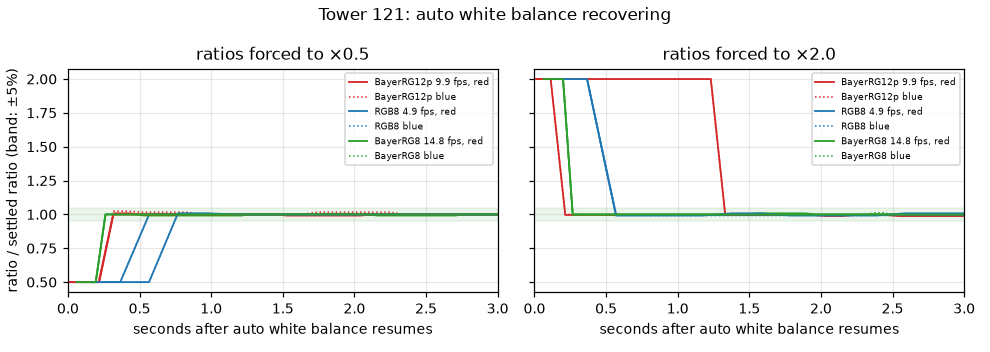
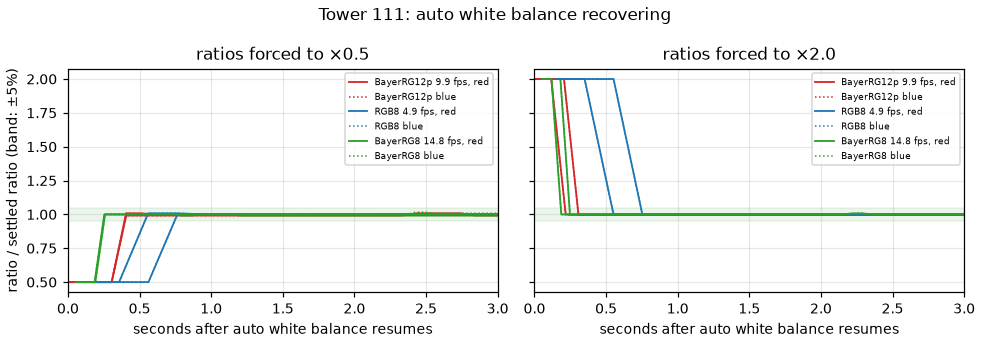
Figure 5. White-balance ratios (the red and blue gains relative to green) divided by their settled values, against time (s) after automatic white balance is switched back on at time 0, for each format: (a, top) tower 121; (b, bottom) tower 111. A value of 1.0 means settled. Left: ratios forced to half (×0.5); right: to double (×2). Shaded: the ±5% band counted as settled.
Table 12. Settling time after a forced white-balance step: time (s), and in parentheses frames, until both the red and the blue ratio are within ±5% of the reference and remain there. Ranges over the ×0.5 and ×2 steps, two runs each.
| Format | Rate (fps) | Tower 121: time (s) (frames) | Tower 111: time (s) (frames) |
|---|---|---|---|
| BayerRG12p | 9.86 | 0.21–0.32 (2–3); once 1.33 | 0.22–0.41 (2–4) |
| RGB8 | 4.95 | 0.57–0.77 (2–3) | 0.55–0.76 (2–3) |
| BayerRG8 | 14.75 | 0.26–0.27 (3) | 0.19–0.26 (2–3) |
On a still scene the automatic ratios held within ±0.8–3.1%. White balance settles much faster than exposure.
3.5 Processing time per step
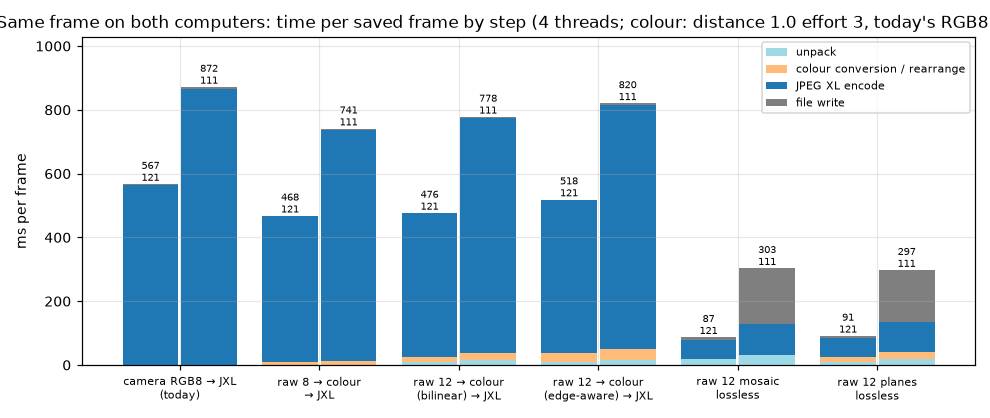
Figure 6. Time per saved frame (ms), split by step, on the shared frame (tower 121's frame copied bit-exactly to both towers, so only the computer differs). 4 encoder threads. Colour paths at d1.0 e3 (JPEG XL distance 1.0, effort 3); today's RGB8 path at its current setting d0.8 e4.
Table 13. Duration (ms) of each processing step for one frame on the shared frame, 4 encoder threads, median of 3 runs. Delta / IOTA: ratio of the two times (above 1 = the Delta is slower). d1.0 e3: JPEG XL distance 1.0, effort 3. The last two rows differ mainly through the towers' storage write speeds.
| Step | IOTA (ms) | Delta (ms) | Delta / IOTA |
|---|---|---|---|
| Unpack 12-bit packed → 16-bit | 10 | 17 | 1.7 |
| Colour conversion, 8-bit raw, bilinear / edge-aware | 8 / 9 | 11 / 12 | 1.3 |
| Colour conversion, 12-bit raw, bilinear / edge-aware | 17 / 28 | 22 / 33 | 1.2 |
| JPEG XL encode, 12-bit colour, d1.0 e3 | 480 | 765 | 1.6 |
| JPEG XL encode, today's RGB8, d0.8 e4 | 566 | 867 | 1.5 |
| File write, 2.7 MB colour file | 1 | 4 | |
| File write, 17–21 MB lossless raw file | 7–8 | 162–173 | (storage 218 vs 76 MB/s) |
Table 14. Total time per saved frame (ms: unpack, colour conversion, encode and file write) and file size (MB), on the shared frame, 4 encoder threads. File sizes are identical on both computers. Raw planes and raw mosaic: raw data saved without colour conversion (Section 1.2).
| Path | IOTA (ms) | Delta (ms) | File size (MB) |
|---|---|---|---|
| Today: RGB8 → JPEG XL, d0.8 e4 | 567 | 872 | 3.27 |
| Raw 8-bit → colour → JPEG XL, d1.0 e3 | 468 | 741 | 2.66 |
| Raw 12-bit → colour (bilinear) → JPEG XL, d1.0 e3 | 476 | 778 | 2.53 |
| Raw 12-bit → colour (edge-aware) → JPEG XL, d1.0 e3 | 518 | 820 | 2.65 |
| Raw 12-bit planes, lossless, e1 | 91 | 297 | 17.65 |
| Raw 12-bit mosaic, lossless, e1 | 87 | 303 | 20.94 |
Unpacking and colour conversion together cost 38 ms on the IOTA and 50 ms on the Delta (7% of the save); the JPEG XL encode accounts for 90%. Here the "RGB8" input is the tower's own colour conversion of the frame, so its file equals the raw 8-bit path's; the camera's real RGB8 files were somewhat larger (3.7–4.0 MB, Appendix B).
3.6 Effort and threads
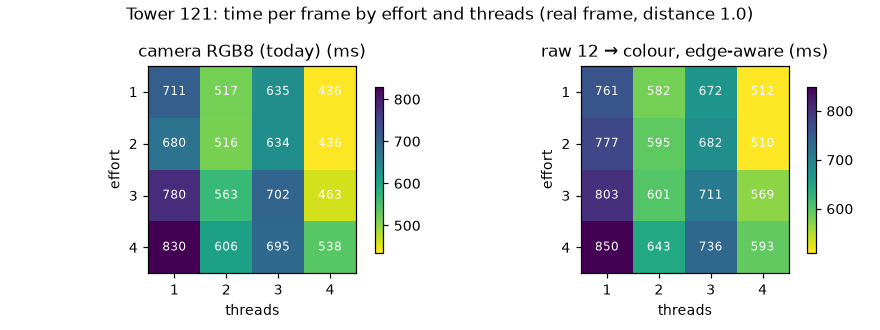
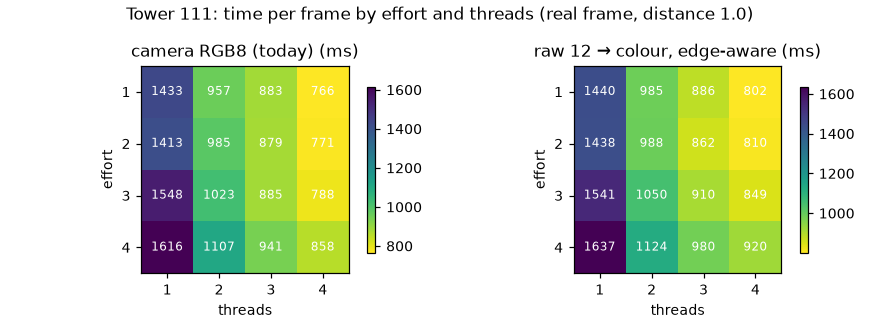
Figure 7. Time per saved frame (ms) by JPEG XL effort (rows) and thread count (columns), each tower's own real frame, distance 1.0: (a, top) tower 121; (b, bottom) tower 111. Effort: how hard the encoder searches for a compact encoding (1 = fastest; higher = slower, usually smaller). Threads: processor threads one encode may use.
Effort 1–4 lie within about 15% of each other, and effort 3 gives the smallest files. On the IOTA, 3 threads is slower than 2 at every effort (761 / 582 / 672 / 512 ms for 1–4 threads at effort 1); the Delta scales normally (1440 / 985 / 886 / 802 ms). Four threads is fastest on both computers.
3.7 Quality setting: size, time and quality
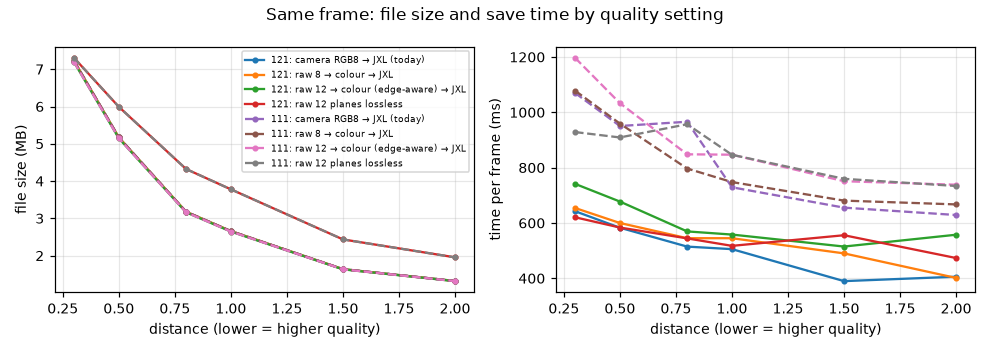
Figure 8. File size (MB, left) and time per saved frame (ms, right) against JPEG XL distance on the shared frame, effort 3, 4 threads, both towers. Distance is the encoder's quality setting: 0 is lossless, 1.0 is intended to be visually indistinguishable from the original, and higher values give smaller files with more loss.
Table 15. File size (MB) and time per saved frame (ms) per JPEG XL distance on the shared frame (effort 3, 4 threads, file write included, median of 2 runs). Last column: raw planes (Section 1.2) at the same distance.
| Distance | 12-bit colour size (MB) | IOTA time (ms) | Delta time (ms) | Raw 12-bit planes size (MB) |
|---|---|---|---|---|
| 0 (lossless) | 44.8 | 1225 | 2906 | 16.8 (IOTA 455 ms, Delta 860 ms) |
| 0.3 | 7.19 | 742 | 1197 | 7.31 |
| 0.5 | 5.15 | 678 | 1033 | 5.99 |
| 0.8 | 3.16 | 570 | 848 | 4.32 |
| 1.0 | 2.65 | 558 | 847 | 3.78 |
| 1.5 | 1.63 | 515 | 751 | 2.44 |
| 2.0 | 1.32 | 558 | 738 | 1.96 |
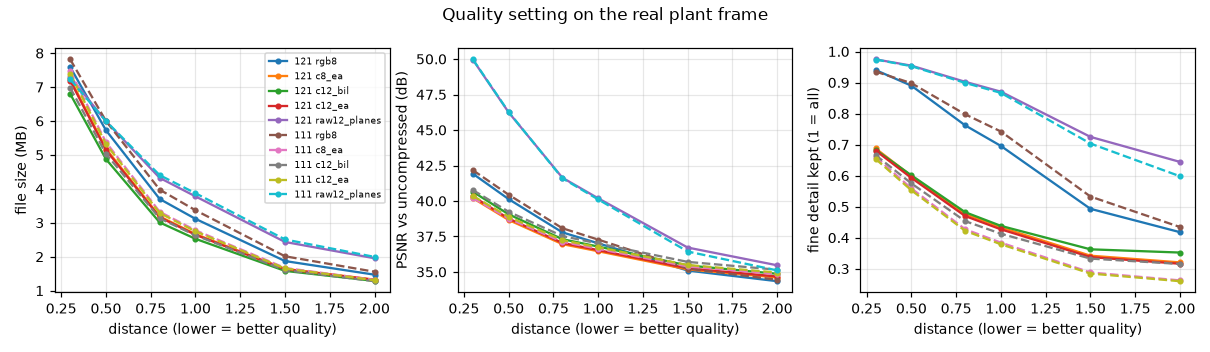
Figure 9. File size (MB), PSNR (dB) and fine-detail retention against JPEG XL distance, each tower's own real frame, each method compared with its own uncompressed image. Fine-detail retention: the amount of fine detail (Laplacian energy) in the decoded image relative to the uncompressed one; 1 = all detail kept, below 1 = smoothed.
Table 16. Image quality against the exact lossless 12-bit colour image of the same frame (real frame, ≈ 15 dB gain; the towers agree within 0.3 dB). PSNR (dB): peak signal-to-noise ratio, higher means closer to the reference; +6 dB means half the error. SSIM: structural similarity, comparing local patterns of brightness and contrast, 0–1 with 1 = identical. Exact: decodes bit for bit to the original. Colour rows use edge-aware conversion unless stated.
| Saved as | File size, 121 / 111 (MB) | PSNR (dB) | SSIM |
|---|---|---|---|
| 12-bit colour, d0.3 | 7.2 / 7.4 | 40.3 | 0.994 |
| 12-bit colour, d0.5 | 5.1 / 5.3 | 38.8 | 0.989 |
| 12-bit colour, d0.8 | 3.2 / 3.3 | 37.1 | 0.978 |
| 12-bit colour, d1.0 | 2.6 / 2.7 | 36.6 | 0.973 |
| 12-bit colour, d1.5 | 1.6 / 1.7 | 35.4 | 0.960 |
| 12-bit colour, d2.0 | 1.3 / 1.3 | 34.8 | 0.953 |
| 12-bit colour, bilinear, d1.0 | 2.5 / 2.6 | 36.6 | 0.968 |
| 12-bit raw planes, d0.5 | 6.0 / 6.0 | 47.2 | 0.990 |
| 12-bit raw planes, lossless | 17.6 / 17.7 | exact | 1 |
| 12-bit raw mosaic, lossless | 20.9 / 19.0 | exact | 1 |
| 12-bit colour, lossless | 47.4 / 46.3 | exact | 1 |
Colour JPEG XL is tuned to human vision: it discards sensor noise and fine colour, so PSNR is moderate while SSIM stays high. Raw planes preserve the sensor values much more closely at the same size (47 vs 39 dB, equal SSIM); lossless, they take a third of the space of lossless colour.
3.8 Example images
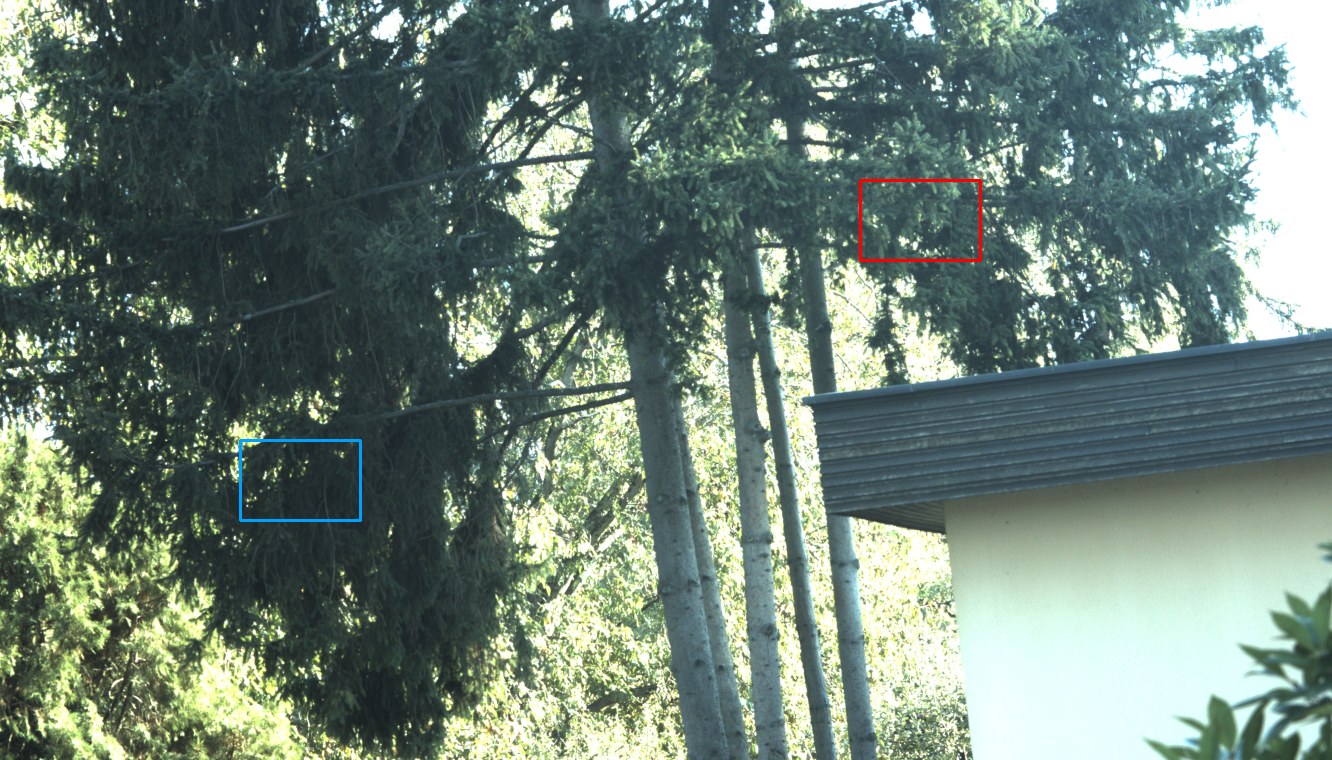
Figure 10. Tower 121's frame (downscaled), with the positions of the detail crop (red) and shadow crop (blue) used in Figure 11.
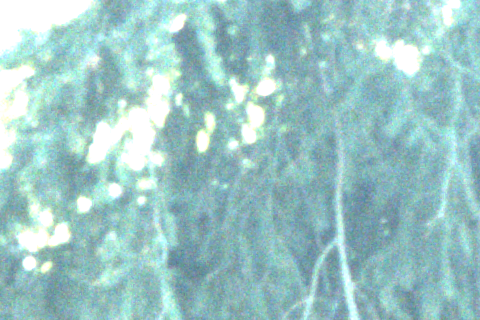
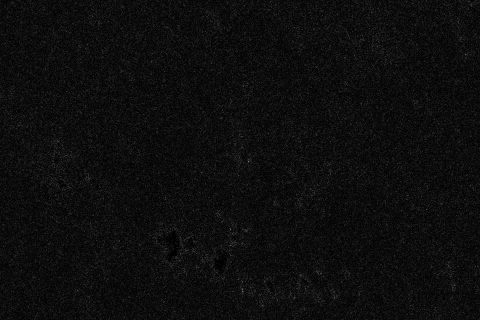
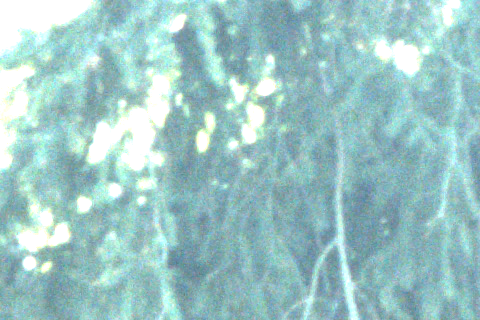
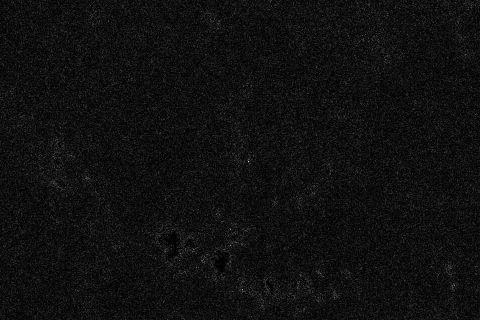
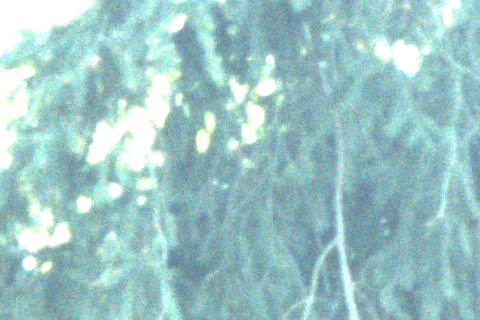
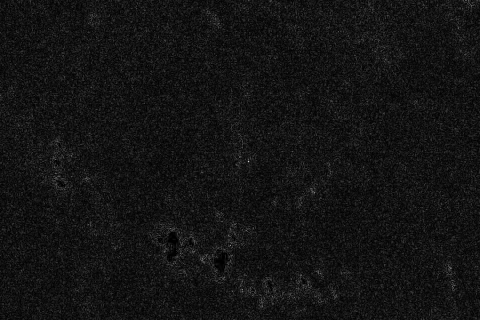
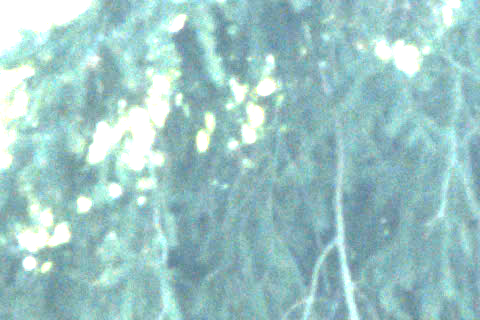
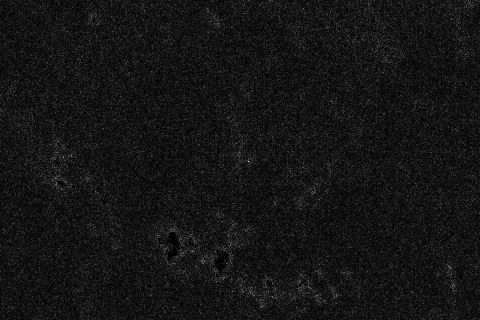
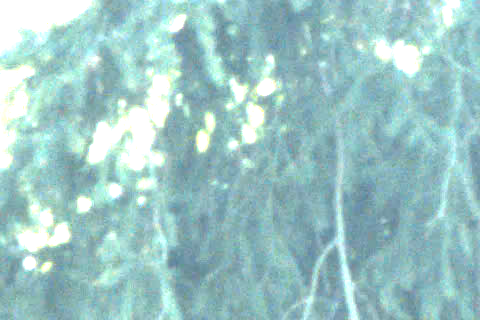
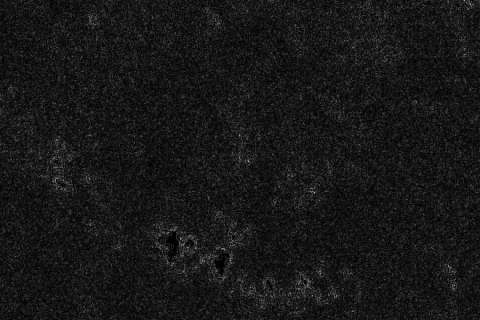
Figure 11. One example per compression method, tower 121's frame, as 480 × 320-pixel crops at 100% (one image pixel per screen pixel). Detail: spruce needles over bright leaves. Difference: the absolute difference from the lossless image, multiplied by 8 so small errors become visible (black = identical). Shadow: a darker crop brightened by 2 stops, i.e. every pixel value multiplied by 4 (each stop doubles), so detail in the dark parts becomes visible. File size (MB) and save time (s) are single runs at 4 threads. The two 8-bit rows are separate captures taken seconds apart (branches move), so they have no difference map.
| Method | File size (MB), time (s) | Detail (100%) | Difference (×8) | Shadow (+2 stops) |
|---|---|---|---|---|
| Camera RGB8, d0.8 e4 (today) | 3.8, 0.62 | 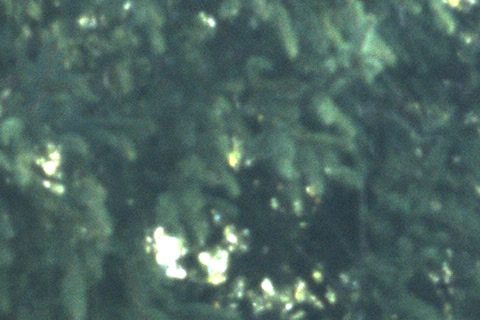 |
– | 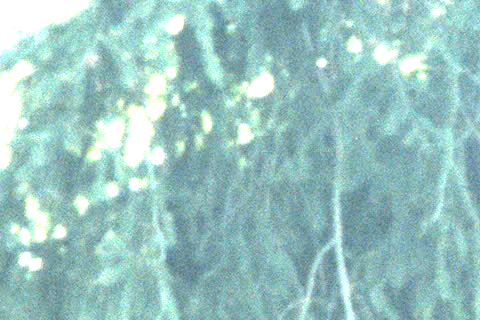 |
| Raw 8-bit → colour, d1.0 | 2.7, 0.45 | 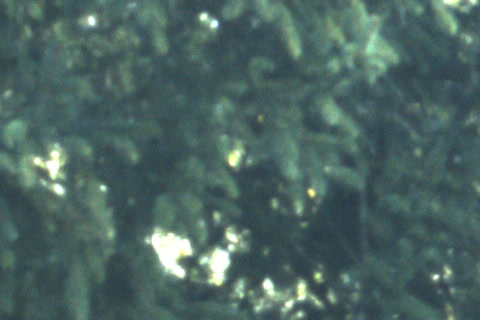 |
– | 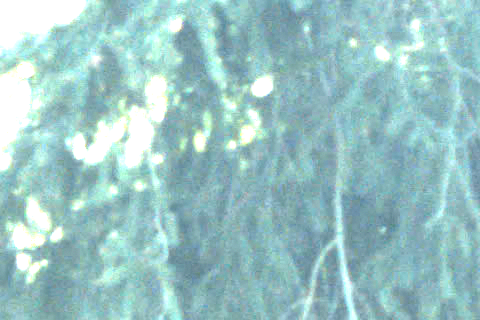 |
| 12-bit colour, lossless (reference) | 47.4, 0.23 | 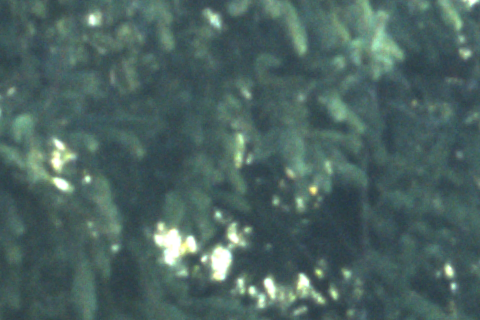 |
 |
 |
| 12-bit colour, d0.3 | 7.2, 0.77 | 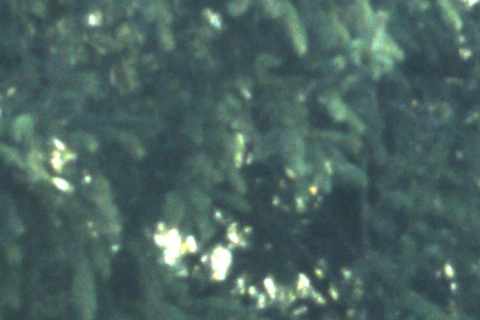 |
 |
 |
| 12-bit colour, d0.5 | 5.1, 0.69 | 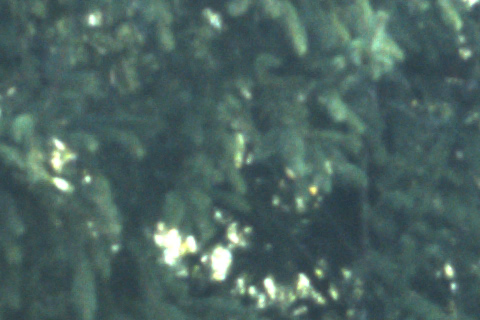 |
 |
 |
| 12-bit colour, d0.8 | 3.2, 0.58 | 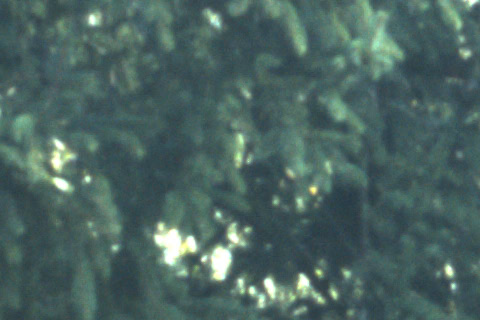 |
 |
 |
| 12-bit colour, d1.0 | 2.6, 0.53 | 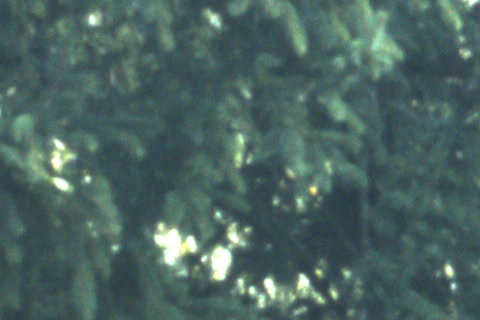 |
 |
 |
| 12-bit colour, d1.5 | 1.6, 0.46 | 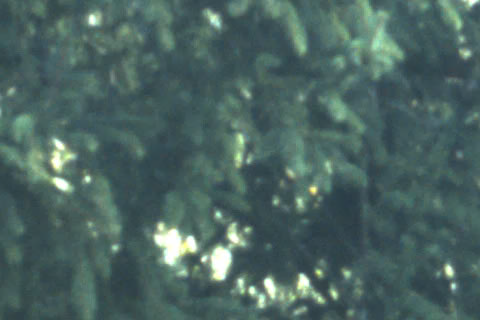 |
 |
 |
| 12-bit colour, d2.0 | 1.3, 0.42 |  |
 |
 |
| 12-bit colour, bilinear, d1.0 | 2.5, 0.48 | 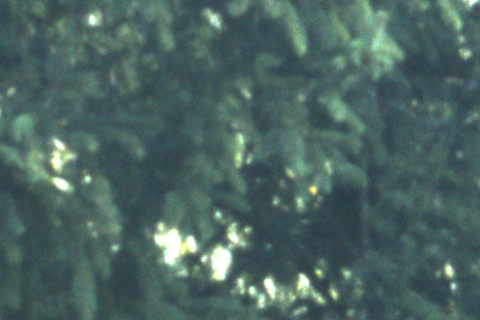 |
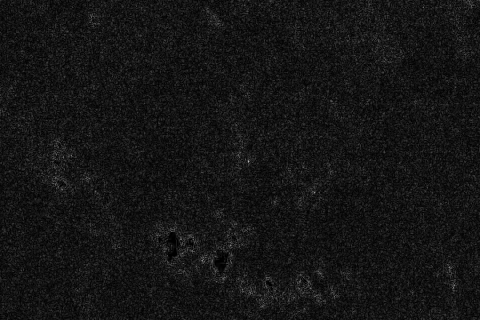 |
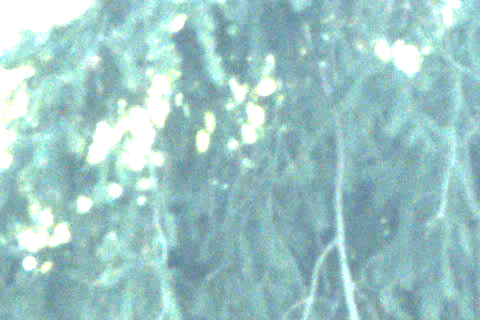 |
| 12-bit raw planes, d0.5 | 6.0, 0.54 | 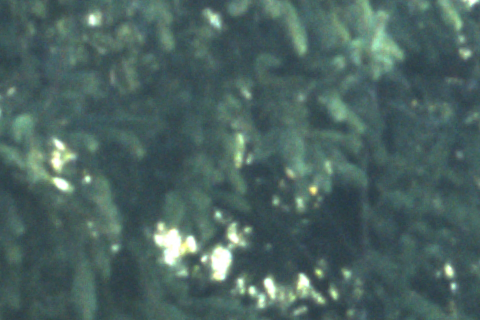 |
 |
 |
| 12-bit raw planes, lossless | 17.6, 0.09 |  |
 |
 |
| 12-bit raw mosaic, lossless | 20.9, 0.09 |  |
 |
 |
Full-size .jxl files are kept outside the repository in tools/camera-bench/examples-*
(about 115 MB per set), including tower 111's and the 0 dB examples.
3.9 Information content of the 12-bit data
The extra four bits were examined in two scenes: the daylight scene of the main campaign (2 and 4 October, Section 3.9.1), where noise is large, and a dark, high-contrast scene photographed from the Stäffelsberg tower on 7 October (Section 3.9.2), where large parts of the frame are dark at low noise. Section 3.9.3 combines the two.
3.9.1 Daylight scene (2 and 4 October)
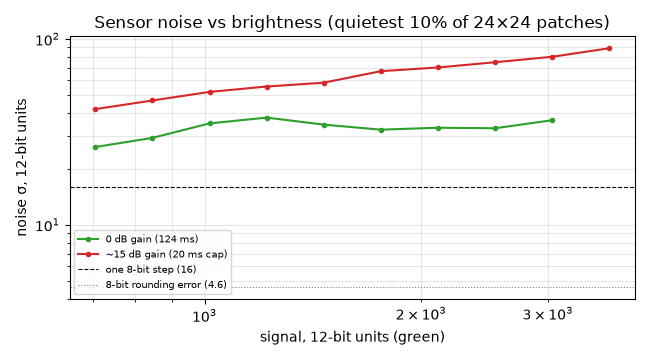
Figure 12. Sensor noise σ (DN, 12-bit scale) against signal level (DN, 12-bit scale), measured on the green pixels, at 0 dB gain and at ≈ 15 dB gain. σ is the standard deviation of the random pixel-to-pixel variation. Dashed: one 8-bit quantisation step, the smallest change an 8-bit value can record (16 DN on the 12-bit scale). Dotted: the RMS error added by rounding to 8 bits (16/√12 = 4.6 DN). Noise above these lines means rounding to 8 bits loses nothing measurable.
Table 17a. Sensor noise floor σ (DN, 12-bit scale, 0–4095) at three signal levels, green pixels, at 0 dB and ≈ 15 dB gain. Last column: the same noise in 8-bit steps (one step = 16 DN on the 12-bit scale); above 1, the 8-bit values already resolve all the sensor delivers.
| Signal (DN, 12-bit) | Noise at 0 dB (DN) | Noise at ≈ 15 dB (DN) | Noise in 8-bit steps, 0 dB / 15 dB |
|---|---|---|---|
| ≈ 700 (darkest in this scene) | 26 | 42 | 1.6 / 2.6 |
| ≈ 1500 | 35 | 58 | 2.2 / 3.6 |
| ≈ 3000 | 37 | 80 | 2.3 / 5.0 |
Rounding against noise. Rounding to 8 bits adds an RMS error of 4.6 DN (12-bit scale). Independent errors add as the square root of the sum of their squares, so in the worst case measured (26 DN of noise at 0 dB) the total grows from 26 to 26.4 DN, i.e. by 1.5%; at ≈ 15 dB gain by 0.6%, and in bright areas by less than 0.2%. Because the noise is larger than one 8-bit step, it also acts as dither: averaging over an area recovers differences finer than one step even from 8-bit values. For a single daylight frame, rounding to 8 bits therefore loses almost nothing measurable.
Averaging over many pixels. Averaging an area of N pixels reduces the noise by √N, which might seem to favour the 12-bit image. But while the noise exceeds one 8-bit step, the rounding error is also random and independent from pixel to pixel, so it averages down at the same rate: an average of 8-bit values resolves differences much finer than one step, as precisely as the 12-bit average. A 12-bit image always holds at least as much information as its 8-bit version, but at a noise of 26 DN (≈ 2^4.7) the four bits removed by rounding mostly record the noise itself; the information they carry about the scene is about 0.02 bits per pixel. This changes when the noise falls below one 8-bit step: the rounding error is then the same for neighbouring pixels, averaging cannot remove it, and the dropped bits hold real scene detail.
Rounding against compression. The saved file is lossy. At distance 1.0 the 12-bit colour file has a PSNR of 36.6 dB (Table 16), an RMS error of about 61 DN, which is 13 times the rounding error; even at distance 0.3 (40.3 dB) it is about 40 DN, and raw planes at distance 0.5 (47.2 dB) about 18 DN. Much of this error is noise the encoder discards, and JPEG XL spends relatively more precision on dark tones, so the error in shadows is smaller than these averages (measured on the dark scene in Table 17d). Still, with lossy files the compression, not the bit depth, decides how much fine tonal detail survives. Correspondingly, 12-bit and 8-bit raw give the same file size at distance 1.0 on this scene (2.65 and 2.66 MB, Table 14).
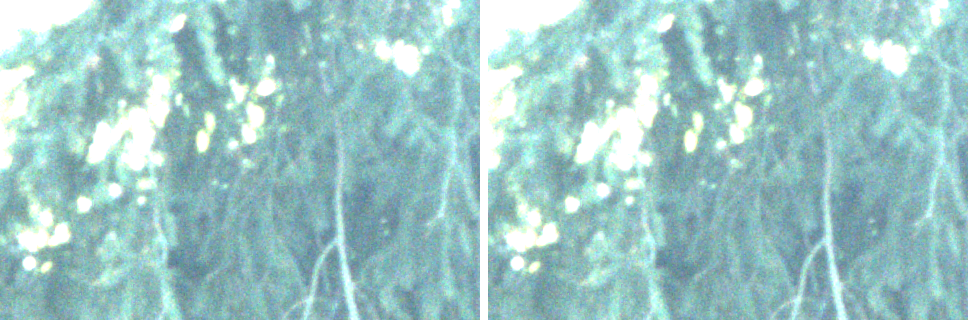
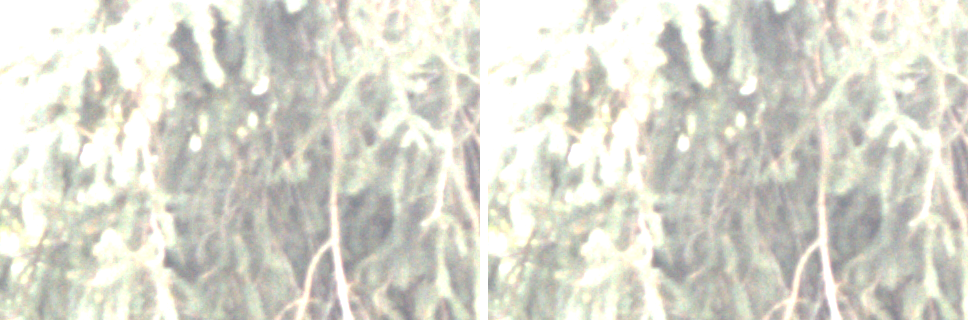
Figure 13a. The darkest textured crop of the daylight scene (mean ≈ 810 DN) brightened by 2 stops (pixel values multiplied by 4), saved as 8-bit (left; the 12-bit value shifted down by 4 bits, i.e. divided by 16) and as 12-bit (right): top, ≈ 15 dB gain, 227 distinct green levels in 8-bit against 3138 in 12-bit; bottom, 0 dB gain. No visible difference: the noise is larger than the extra levels.
At 0 dB gain the same settings produce 25–30% smaller files and about 3 dB higher PSNR (less noise to encode): 12-bit colour at d1.0 is 1.9 MB, PSNR 40.0 dB, SSIM 0.987.
3.9.2 Dark, high-contrast scene (Stäffelsberg, 7 October)
Scene and method. On the morning of 7 October 2026, an Alvium 1800 U-1620c (5328 × 3040) on the
Stäffelsberg tower took two frames of the same view, one after the other: hazy sky and a distant valley above a
slope of shaded forest (Figure 13b). One was taken as BayerRG12p, converted to colour by the camera's
viewer program and saved as a 16-bit TIFF (the 12-bit values in the top 12 bits); the other as the camera's
RGB8 (today's format), saved as PNG. Gain and exposure were not recorded with the files. The 12-bit
frame spans 128–2792 DN (green), with nothing clipped: a third of it is darker than 300 DN, the
region where Section 3.9.1 expected 12 bits to matter.
The camera's RGB8 frame is a separate capture (trees move between frames) made by the camera's own
colour processing, so it is compared by eye and by statistics only. For an exact comparison of bit
depth, an 8-bit version of the same frame was made by keeping the top 8 of the 12 bits (the
12-bit value divided by 16, rounded down, as BayerRG8 delivers), and compared pixel by pixel with
the 12-bit original. The 12-bit frame was converted to colour by the viewer, not by the tower's
edge-aware conversion, so its noise is not directly comparable with Figure 12 (measured on the raw
green pixels); for comparison, the October frames' lossless 12-bit colour files were measured in
the same way. Compression used libjxl 0.12.0 on the laptop with the tower's settings (effort 3;
12-bit and 8-bit input as declared by their bit depth), single runs. Script:
tools/camera-bench/compare_8_vs_12.py; results in
docs/images/raw12/examples/staeffelsberg/results.json.
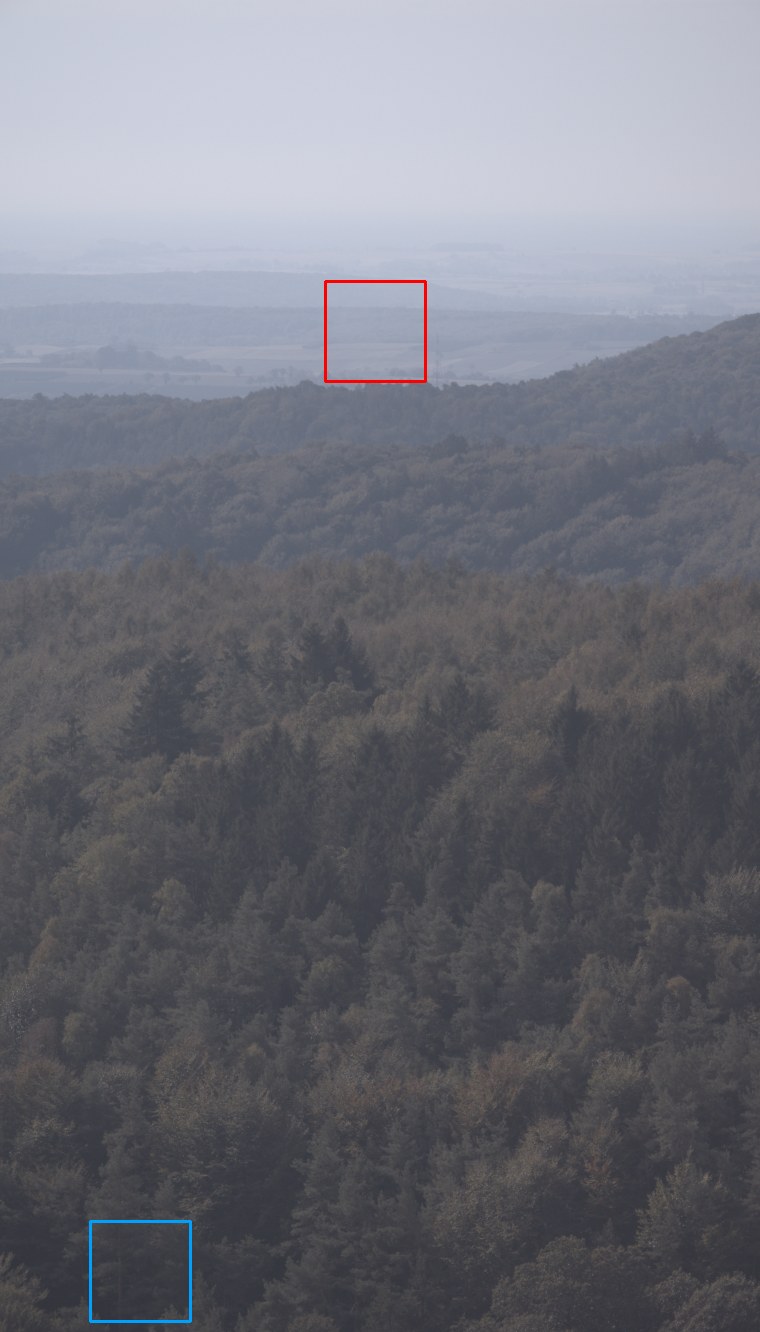
Figure 13b. The Stäffelsberg 12-bit frame, shown upright (the frame is rotated by 90° so that the sky is at the top), at a quarter of full size and with a display brightness curve (sRGB) so that the forest is visible. Blue: the dark crop of Figures 13d and 13f (shaded forest, mean 194 DN). Red: the mid-tone crop of Figure 13e (distant valley in haze, mean 1606 DN).
Noise. The noise in each colour image was measured as the standard deviation of each pixel around its local average (a Gaussian average over about 2 pixels), in 24 × 24-pixel patches grouped by brightness, taking the quietest 10% of each group as in Section 2.11; the result was calibrated on generated noise of known σ.
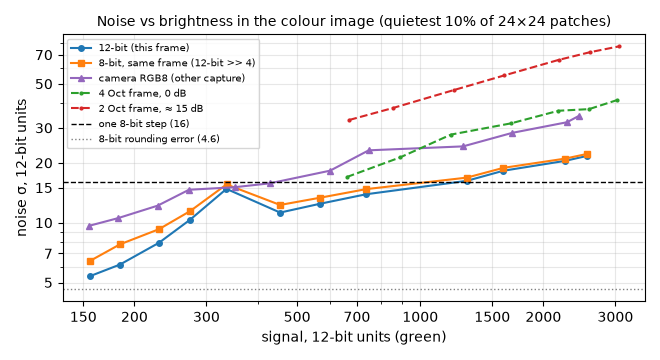
Figure 13c. Noise σ (DN, 12-bit scale) against signal (DN, 12-bit scale, green) in the colour images: the Stäffelsberg 12-bit frame (blue), its 8-bit version (orange), the camera's RGB8 frame of the same view (purple, another capture, multiplied by 16 to the 12-bit scale), and the October 0 dB and ≈ 15 dB frames measured the same way (dashed). Dashed line: one 8-bit step (16 DN); dotted line: the RMS error of rounding to 8 bits (4.6 DN). The bump at ≈ 340 DN is scene texture that remains even in the quietest patches.
Table 17c. Noise σ (DN, 12-bit scale) in the Stäffelsberg colour images at selected signal levels (DN, 12-bit scale, green). In 8-bit steps: the 12-bit noise divided by 16; below 1, an 8-bit value cannot record the variation the sensor delivers. Increase: how much rounding to 8 bits raises the noise. Camera RGB8: another capture, the camera's own colour processing.
| Signal (DN) | 12-bit noise (DN) | In 8-bit steps | 8-bit version, same frame (DN) | Increase from rounding | Camera RGB8 (DN) |
|---|---|---|---|---|---|
| ≈ 160 | 5.4 | 0.34 | 6.4 | +19% | 9.6 |
| ≈ 185 | 6.2 | 0.39 | 7.8 | +26% | 10.5 |
| ≈ 230 | 7.9 | 0.49 | 9.3 | +18% | 12.2 |
| ≈ 275 | 10.4 | 0.65 | 11.4 | +10% | 14.6 |
| ≈ 450 | 11.2 | 0.70 | 12.3 | +10% | 15.8 |
| ≈ 740 | 13.9 | 0.87 | 14.8 | +6% | 23.1 |
| ≈ 1300 | 16.2 | 1.01 | 16.9 | +4% | 24.2 |
| ≈ 2250 | 20.5 | 1.28 | 21.0 | +2% | 32.0 |
In this frame the noise stays below one 8-bit step up to about 1300 DN, which covers about 70% of the frame. At ≈ 700 DN the October frames, measured the same way, have 17 DN (0 dB) and 33 DN (≈ 15 dB) against 14 DN here, and they contain nothing darker. Rounding to 8 bits raises the noise in the forest by 10–26%, against at most 1.5% in the daylight scene. The camera's RGB8 frame is 1.4–1.8 times noisier than the 12-bit frame at every brightness, probably from the camera's own colour processing; this is a difference of the camera's conversion, not of bit depth.
Levels and visibility. The 400 × 400-pixel dark crop (green 129–557 DN) uses 272 distinct green levels in 12-bit, 25 in its 8-bit version and 22 in the camera's RGB8.
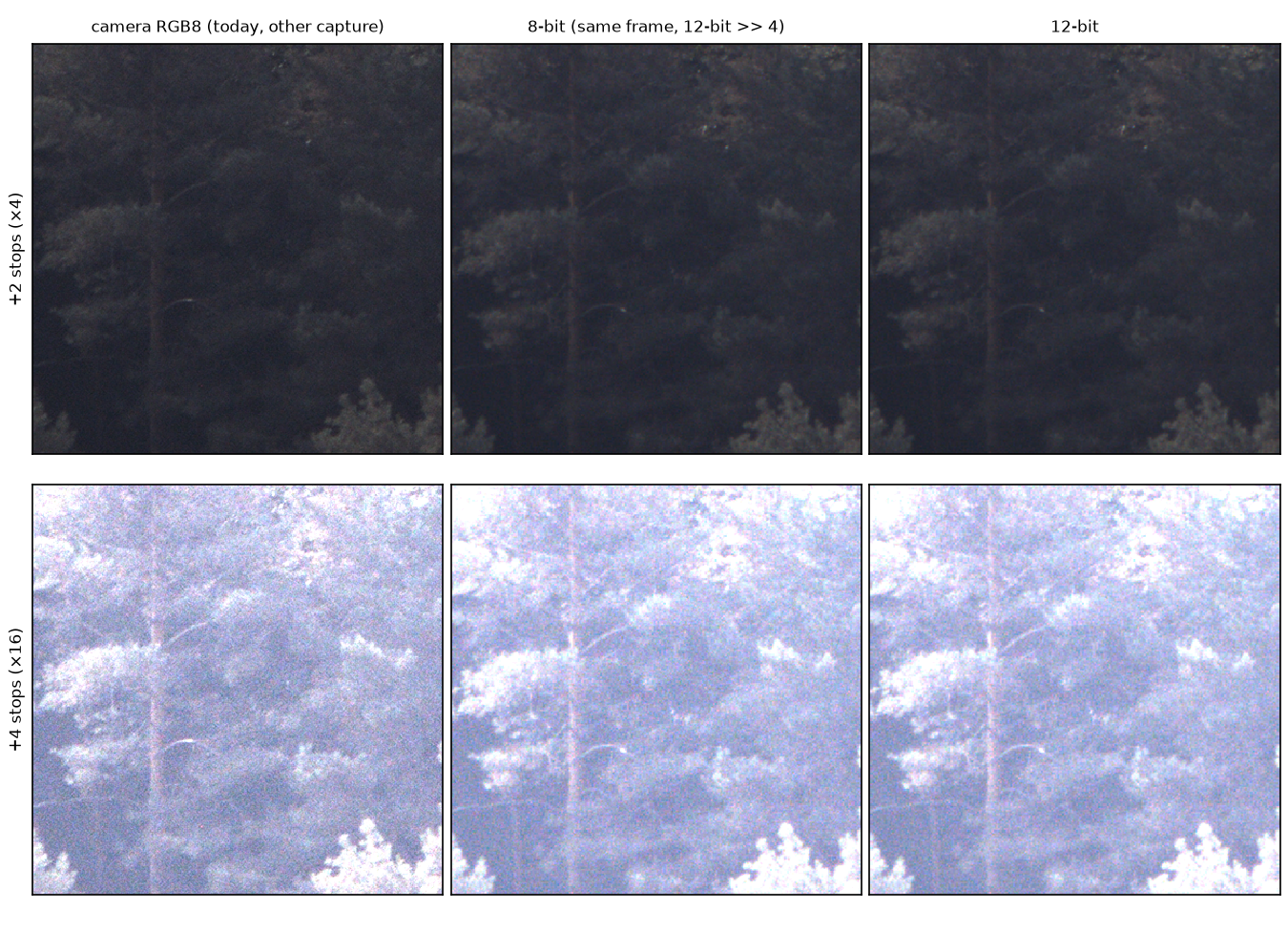
Figure 13d. The dark crop (shaded forest, mean 194 DN) at 100%, brightened by 2 stops (pixel values ×4, top) and 4 stops (×16, bottom). Left: the camera's RGB8 frame (another capture, taken separately; branches moved). Middle: the 8-bit version of the 12-bit frame (top 8 bits). Right: the 12-bit frame. Not compressed.
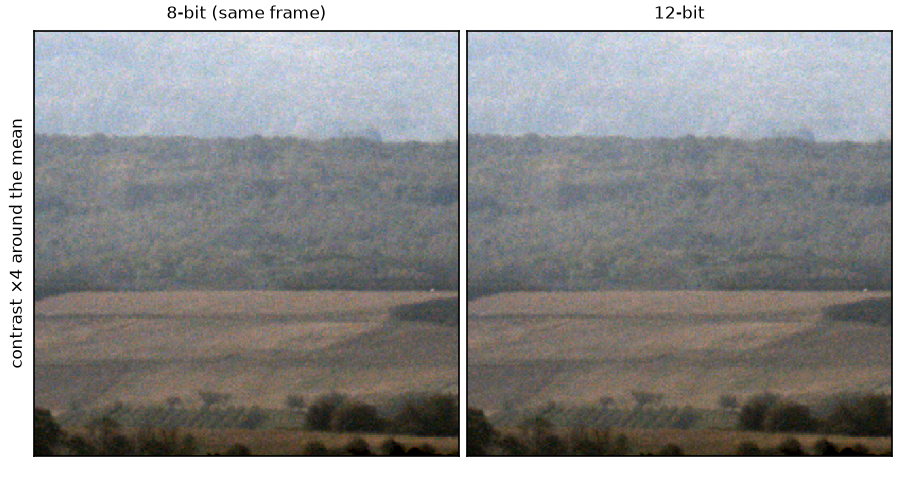
Figure 13e. Control: the mid-tone crop (distant valley in haze, mean 1606 DN, noise about one 8-bit step) with its contrast stretched 4 times around the crop's mean, 8-bit version (left) and 12-bit (right). Not compressed. No visible difference.
Uncompressed, the 8-bit forest is slightly grainier than the 12-bit one at +4 stops, with no banding (Figure 13d): even at 0.3–0.5 of a step the noise still dithers the rounding. Averaged over about 200 pixels (a Gaussian of 4 pixels), the 8-bit version differs from the 12-bit frame by 0.6 DN RMS in every brightness range (Table 17d): the local brightness, which is what a faint, even haze such as thin smoke changes, survives rounding to within less than a tenth of an 8-bit step.
Compression. Each version was saved as JPEG XL and compared with the 12-bit frame in three brightness regions: dark (below 300 DN, 33% of the frame), mid (300–1000 DN, 39%) and bright (1000 DN and above, 28%). Two errors are given: per pixel, which includes noise the encoder discards; and of the local average, after averaging both images over about 200 pixels, which measures lost scene brightness rather than lost noise. A third version tests the encoder rather than the data: the same 8-bit values, stored as a 12-bit file (each value × 16 + 8).
Table 17d. File size (MB) and RMS error (DN, 12-bit scale) against the 12-bit frame, per brightness region, for the 12-bit frame, its 8-bit version, and its 8-bit values stored in a 12-bit file, at JPEG XL distance 0 (lossless), 0.3, 0.5 and 1.0, effort 3. Per pixel: the error at each pixel. Local average: the error after averaging both images over about 200 pixels (Gaussian, σ = 4 pixels). Today's file (camera RGB8, d0.8, effort 4) is 0.92 MB; the camera RGB8 frame at d1.0 is 0.66 MB (another capture, so no error can be computed).
| File | Distance | Size (MB) | Per pixel, dark / mid / bright (DN) | Local average, dark / mid / bright (DN) |
|---|---|---|---|---|
| 12-bit | lossless | 38.6 | 0 / 0 / 0 | 0 / 0 / 0 |
| 12-bit | 0.3 | 3.40 | 12.3 / 18.0 / 35.8 | 0.6 / 0.9 / 2.5 |
| 12-bit | 0.5 | 2.13 | 14.3 / 20.8 / 39.9 | 0.9 / 1.4 / 3.8 |
| 12-bit | 1.0 | 0.92 | 16.8 / 24.3 / 43.0 | 1.6 / 2.6 / 6.0 |
| 8-bit | lossless | 15.5 | 4.6 / 4.6 / 4.6 | 0.6 / 0.6 / 0.6 |
| 8-bit | 0.3 | 2.51 | 17.4 / 21.7 / 29.5 | 1.6 / 1.5 / 1.6 |
| 8-bit | 0.5 | 1.54 | 18.6 / 23.9 / 34.9 | 2.2 / 2.1 / 2.3 |
| 8-bit | 1.0 | 0.63 | 20.4 / 26.7 / 41.0 | 3.7 / 3.4 / 4.0 |
| 8-bit values, 12-bit file | lossless | 39.0 | 4.6 / 4.6 / 4.6 | 0.6 / 0.6 / 0.6 |
| 8-bit values, 12-bit file | 0.3 | 3.50 | 12.7 / 18.3 / 35.9 | 0.9 / 1.1 / 2.6 |
| 8-bit values, 12-bit file | 0.5 | 2.19 | 14.6 / 21.0 / 40.0 | 1.1 / 1.6 / 3.8 |
| 8-bit values, 12-bit file | 1.0 | 0.94 | 16.9 / 24.4 / 43.0 | 1.8 / 2.6 / 6.0 |
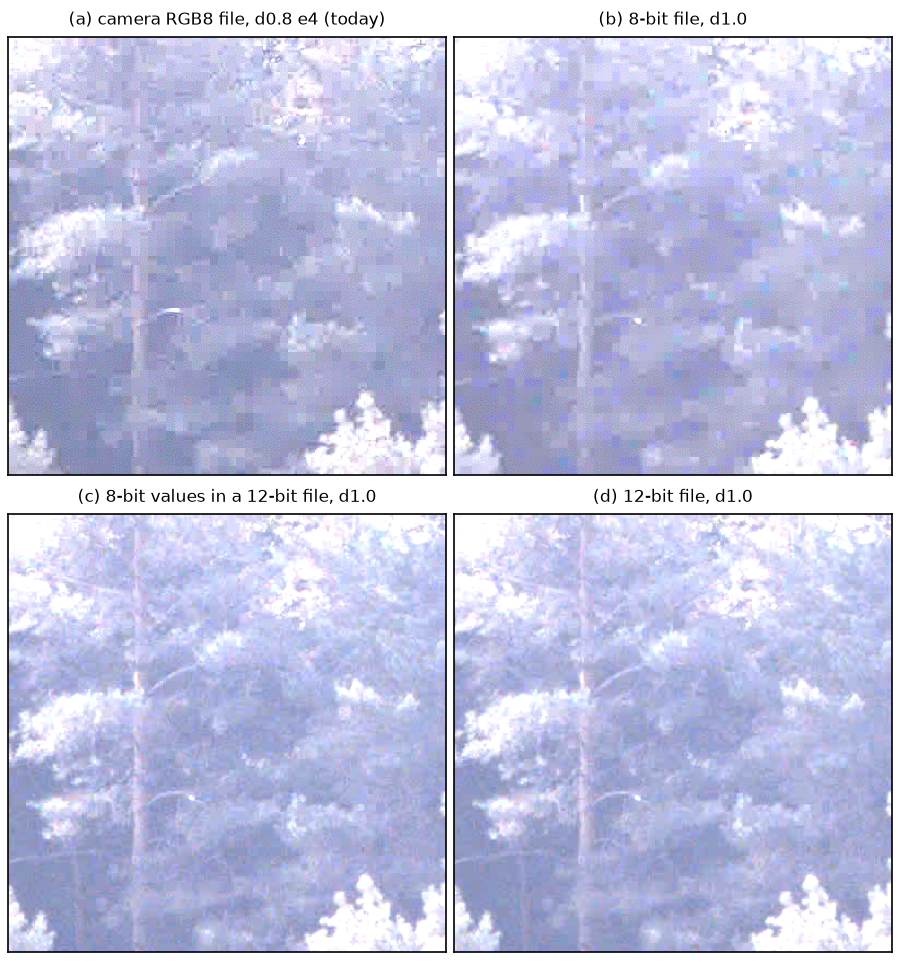
Figure 13f. The dark crop of Figure 13d after saving, brightened by 4 stops (×16): (a) the camera's RGB8 frame saved as today (distance 0.8, effort 4; another capture); (b) the 8-bit version saved as an 8-bit file at distance 1.0; (c) the same 8-bit values saved as a 12-bit file at distance 1.0; (d) the 12-bit frame at distance 1.0 (the proposed setting). Effort 3 unless stated.
At distance 1.0, the 8-bit file loses the shadow detail: the forest breaks into flat blocks (Figure 13f b), and the local brightness in the dark region is off by 3.7 DN against 1.6 DN for the 12-bit file. Today's RGB8 file shows the same blocks (Figure 13f a), although it is as large as the 12-bit file (0.92 MB). In the bright region the order reverses (4.0 against 6.0 DN): an 8-bit file gets about the same error at every brightness, a 12-bit file a smaller error in the dark and a larger one in the bright.
This is a property of the encoder, not of the four extra bits: the same 8-bit values saved as a 12-bit file behave almost exactly like the 12-bit frame (1.8 against 1.6 DN in the dark, 0.94 against 0.92 MB, Figure 13f c). How the bits are spent depends on the bit depth the file declares. As a consequence, on this scene the 12-bit file at distance 1.0 is 46% larger than the 8-bit file (0.92 against 0.63 MB), whereas in the daylight scene the two were the same size (Table 14); dark frames are in any case far smaller than the 2.65 MB of the daylight frame used for the storage estimate (Section 3.12).
Today's format against BayerRG12p at the same setting. To answer directly whether a reader
would see a difference between today's files and 12-bit files, both frames were saved with the
same JPEG XL setting, today's distance 0.8 and effort 4. The two frames are separate captures, so
each file is compared with its own uncompressed original rather than with the other (Table 17e,
Figures 13g and 13h).
Table 17e. The camera's RGB8 frame and the BayerRG12p frame, both saved as JPEG XL at
distance 0.8, effort 4: file size (MB) and RMS error (DN, 12-bit scale; RGB8 values × 16) against
each file's own uncompressed frame, per brightness region as in Table 17d. Per pixel: the error at
each pixel. Local average: the error after averaging over about 200 pixels.
| File (d0.8, effort 4) | Size (MB) | Per pixel, dark / mid / bright (DN) | Local average, dark / mid / bright (DN) |
|---|---|---|---|
| Camera RGB8 (today) | 0.92 | 18.0 / 21.4 / 34.3 | 2.2 / 2.3 / 2.8 |
BayerRG12p, 12-bit file |
1.22 | 16.3 / 23.6 / 42.4 | 1.2 / 1.9 / 4.4 |
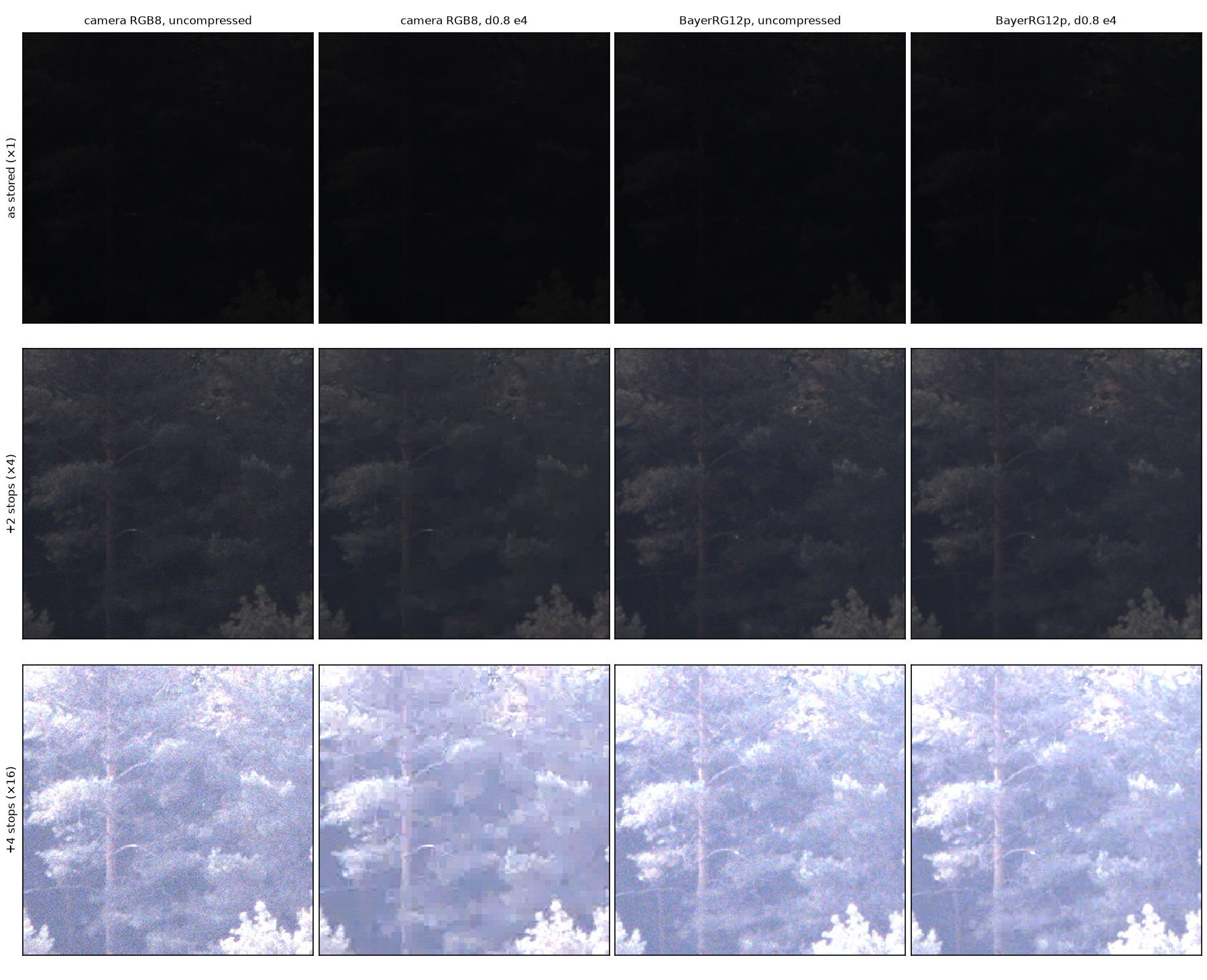
Figure 13g. The dark crop of Figure 13d from the camera's RGB8 frame and from the BayerRG12p
frame, each uncompressed and saved at distance 0.8, effort 4 (the same setting for both). Rows: as
stored (×1, as a viewer shows the linear values), brightened by 2 stops (×4) and by 4 stops (×16).
The two frames are separate captures; branches moved between them.
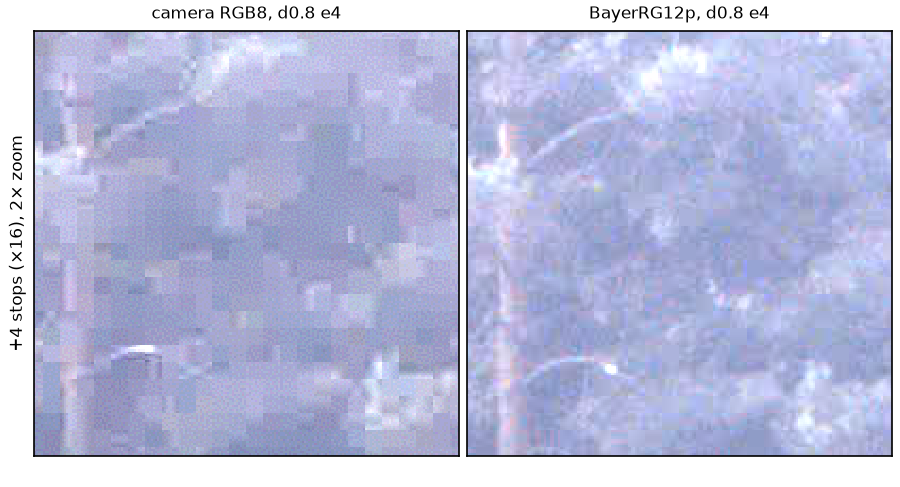
Figure 13h. The middle 200 × 200 pixels of the two saved crops of Figure 13g at +4 stops,
enlarged 2 times (each pixel shown as 2 × 2 screen pixels): camera RGB8 (left) and BayerRG12p
(right), both at distance 0.8, effort 4.
As stored, the shaded forest is almost black and the two files cannot be told apart; at +2 stops the RGB8 file is slightly flatter. At +4 stops the difference is clear: the RGB8 file breaks the forest into flat blocks and loses the thin branches, while the 12-bit file stays close to its uncompressed frame (Figure 13h). In the dark region the 12-bit file keeps the local brightness 1.8 times more accurately (1.2 against 2.2 DN) and in the mid-tones 1.2 times; in the bright region the RGB8 file is 1.5 times more accurate (2.8 against 4.4 DN), the same pattern as in Table 17d. At the same setting the 12-bit file is 33% larger (1.22 against 0.92 MB); at distance 1.0 it is the same size as today's file and still free of blocks (Figure 13f d). The difference therefore shows wherever the shadows are brightened: a viewer applying a display curve, an operator raising the brightness, or a detection step stretching the contrast of dark terrain.
In summary, for this dark scene: (1) the four extra bits themselves change little after saving: 1.6 against 1.8 DN of local-brightness error in the dark at distance 1.0, and 0.6 DN when 8-bit values are kept losslessly; (2) saving as a 12-bit file keeps about 2.3 times more accurate shadow brightness than saving as an 8-bit file at the same distance, and visibly more shadow detail than today's RGB8 file at the same size; (3) per pixel, rounding to 8 bits raises the noise in the dark by 10–26%, which matters only for lossless or near-lossless files; (4) with the same JPEG XL setting (distance 0.8, effort 4), today's RGB8 file and the 12-bit file look the same as stored, but at +4 stops the RGB8 shadows break into blocks while the 12-bit file keeps the forest detail and 1.8 times more accurate shadow brightness, in a 33% larger file.
3.9.3 Where 12 bits matter
The noise falls with the signal, while the 8-bit step stays at 16 DN. In the daylight scene the noise was above one 8-bit step everywhere (Figure 12); in the Stäffelsberg scene it was below one step up to about 1300 DN, over 70% of the frame (Figure 13c). Gain multiplies the noise, so at high gain the noise exceeds one 8-bit step again almost everywhere. Table 17b combines these observations.
Table 17b. Situations in which 12-bit data differs from 8-bit data. Signal in DN on the 12-bit scale (0–4095). "Measured" refers to this campaign.
| Situation | Signal (DN), gain (dB) | Noise against one 8-bit step | Effect of 12 bits | Measured |
|---|---|---|---|---|
| Daylight, mid-tones and highlights (lit terrain, sky) | 700–4095, 0–15 | 1.6–5 steps | none measurable: total noise +0.2–1.5% | yes (3.9.1) |
| Shadows in a high-contrast scene at low gain: shaded forest under a bright sky, backlit ridges, valleys at dawn and dusk | below ≈ 1300 in the Stäffelsberg frame | 0.3–1 step | 25 instead of 272 levels in the dark crop, +10–26% noise per pixel; local brightness kept by 8-bit values to 0.6 DN; no visible banding at +4 stops | yes (3.9.2) |
| Uniformly dark scene at high gain: night, gain up to 48 dB | any, high (up to 48) | above 1 step (gain amplifies noise) | little, except in the very darkest values | no |
| Strong processing of dark areas: brightening by 3 stops (×8) or more, contrast stretching | dark areas, any | – | 12 bits delay visible banding | +2 stops in daylight, +4 stops at Stäffelsberg: no banding, 8-bit slightly grainier (Figures 13a, 13d) |
| Saving lossy at distance 1.0 | any | compression error ≈ 17–61 DN per pixel ≫ rounding 4.6 DN | an 8-bit file loses shadow detail (blocks) and 2.3 times more local brightness in the dark than a 12-bit file; caused by the declared file bit depth, not by the missing bits | yes (3.9.2, Table 17d) |
The case most relevant to fire detection is the second: smoke rising in front of shaded forest is a small brightness increase in an already dark area, at low gain. The Stäffelsberg frame is such a scene. There, the proposed 12-bit file at distance 1.0 keeps the local brightness of the shaded forest to 1.6 DN RMS and its texture visibly better than today's RGB8 file of the same size; most of that gain comes from saving a 12-bit file, and would also be available to 8-bit data saved as a 12-bit file. Whether these differences change smoke detection was not measured.
3.10 Saving throughput and pile-up
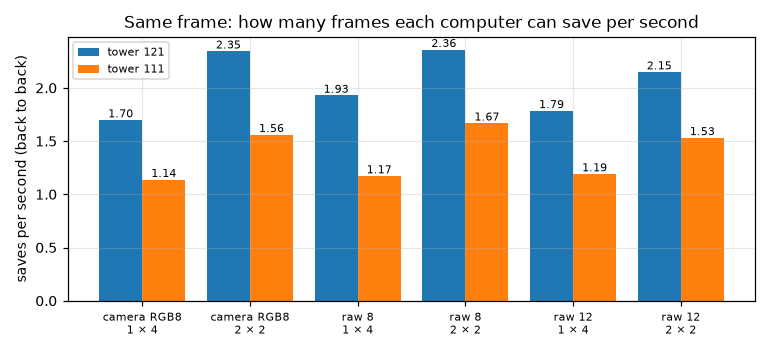
Figure 14. Frames saved per second, back to back (the next save starts as soon as one finishes), on the shared frame, for one save worker with 4 threads and two workers with 2 threads each. A worker saves one frame at a time; two workers save two frames in parallel.
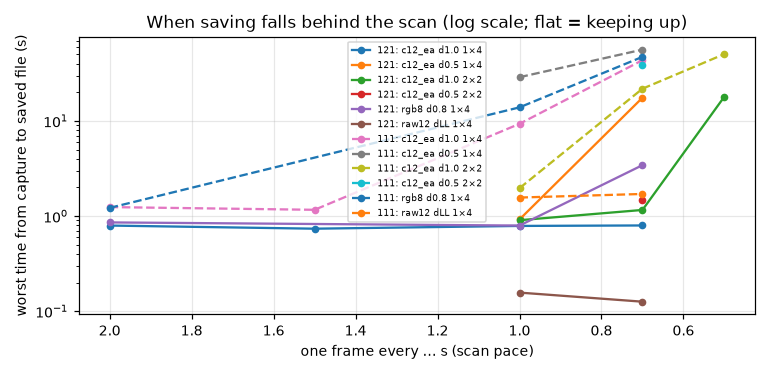
Figure 15. Worst time (s, logarithmic axis) from queueing a frame to its file being written, against the interval (s) between queued frames, synthetic frame. A flat line means saving keeps up; a rising line means a backlog builds.
Table 18. Throughput and pile-up on the synthetic frame, the worst case for the encoder. Workers × threads: frames saved in parallel × encoder threads each. Back to back: frames saved per second when saving continuously. Paced columns: one frame queued every given interval for 120 s; "ok" = no frames waiting at the end, "N behind" = N frames still waiting, "–" = not tested. Peak memory: the most memory (GB) used by the queue and encoders.
| Path | Workers × threads | Tower | Back to back (frames/s) | One frame every 2.0 / 1.5 / 1.0 / 0.7 / 0.5 s | Peak memory (GB) |
|---|---|---|---|---|---|
| Today: camera RGB8, d0.8 e4 | 1 × 4 | 121 | 1.33 | ok / – / ok / 3 behind / – | 0.5 |
| Today: camera RGB8, d0.8 e4 | 1 × 4 | 111 | 0.88 | ok / – / 12 behind / 65 behind / – | 0.5 |
| 12-bit colour, d1.0 e3 | 1 × 4 | 121 | 1.44 | ok / ok / ok / ok / – | 0.7 |
| 12-bit colour, d1.0 e3 | 1 × 4 | 111 | 0.93 | ok / ok / 8 behind / 60 behind / – | 0.7 |
| 12-bit colour, d1.0 e3 | 2 × 2 | 121 | 1.74 | – / – / ok / ok / 34 behind | 1.1 |
| 12-bit colour, d1.0 e3 | 2 × 2 | 111 | 1.18 | – / – / ok / 28 behind / 97 behind | 1.1 |
| 12-bit colour, d1.0 e3 | 4 × 1 | 121 / 111 | 1.99 / 1.37 | (back to back only; each save waits 2–3 s) | 2.0 |
| 12-bit colour, d0.5 e3 | 1 × 4 | 121 | 1.19 | – / – / ok / 24 behind / – | 0.8 |
| 12-bit colour, d0.5 e3 | 1 × 4 | 111 | 0.77 | – / – / 27 behind / 79 behind / – | 0.7 |
| 12-bit raw mosaic, lossless | 1 × 4 | 121 / 111 | 10.2 / 1.8 | ok at 1.0 and 0.7 on both | 0.3 |
On the shared real frame, back to back, a 12-bit save took 0.56 s (IOTA, 1 × 4) and 0.65 s (Delta, 2 × 2); the IOTA kept up with a frame every 0.7 s with one worker, the Delta with two (with one it fell 27 frames behind in 120 s).
3.11 Heat and power
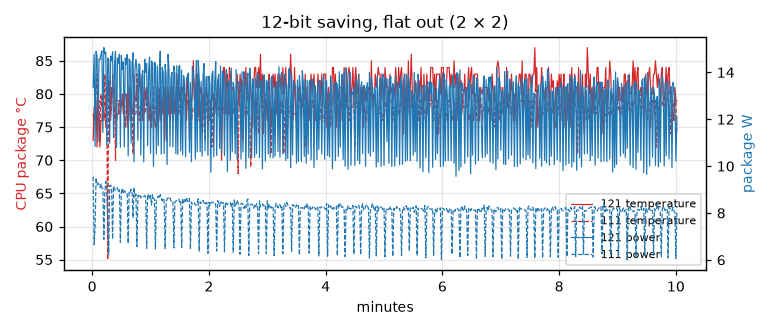
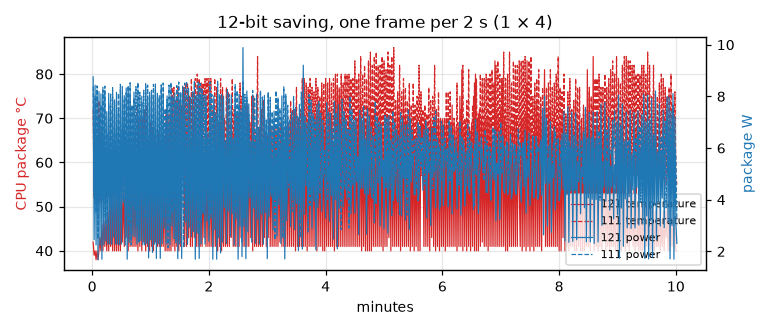
Figure 16. CPU package temperature (°C) and package power (W) over 10 minutes of 12-bit saving; the package is the whole processor chip. (a, top) back to back with 2 workers × 2 threads; (b, bottom) one frame every 2 s with 1 worker × 4 threads. Solid: tower 121; dashed: tower 111.
Table 19. Processor temperature (mean and maximum, °C), average core clock (GHz), CPU busy (% of time the cores were working), and package power (W, read from the Intel RAPL energy counter [7]), 10 minutes per condition after a 5-minute cool-down. Saves per minute in the first and last minute show any slowdown as the processor heats up and lowers its clock.
| Load | Tower | Temperature mean / max (°C) | Clock (GHz) | CPU busy (%) | Power (W) | Saves per minute, first → last minute |
|---|---|---|---|---|---|---|
| Idle | 121 | 38 / 40 | 0.79 | 2 | 2.2 | – |
| Idle | 111 | 52 / 54 | 0.96 | 4 | 2.9 | – |
| 12-bit, one frame every 2 s (1 × 4) | 121 | 53 / 84 | 1.71 | 21 | 5.1 | 30 → 29 |
| 12-bit, one frame every 2 s (1 × 4) | 111 | 66 / 86 | 1.84 | 33 | 5.7 | 30 → 30 |
| 12-bit, back to back (2 × 2) | 121 | 80 / 87 | 2.88 | 81 | 12.5 | 122 → 103 (−16%) |
| 12-bit, back to back (2 × 2) | 111 | 78 / 83 | 2.44 | 81 | 8.1 | 74 → 73 |
At scan pace both computers stay far from their limits; the Delta runs about 13 °C warmer. Back to back, the Delta sits at an 8 W power limit and does not slow further, whereas the IOTA starts at 12.5 W and loses 16% of its throughput as it heats.
3.12 Storage
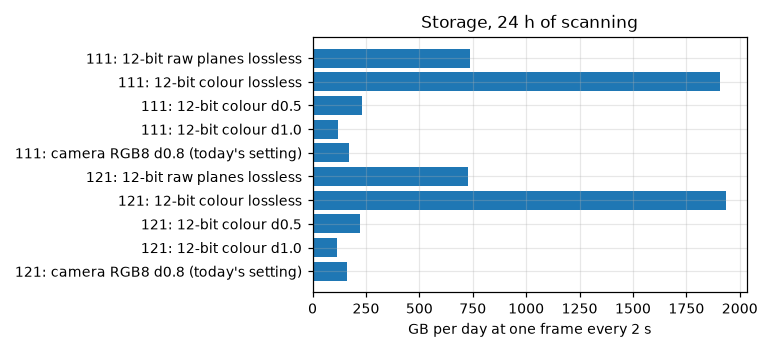
Figure 17. Storage per day (GB) at one saved frame every 2 s, per saving method, file sizes from each tower's own real frame.
Table 20. Storage (GB/day) for 24 hours of scanning at one saved frame every 2, 5 or 10 s. Per-frame sizes (MB) are from each tower's own real frame; ranges span the two towers.
| Saved as | Per frame, 121 / 111 (MB) | Every 2 s (GB/day) | Every 5 s (GB/day) | Every 10 s (GB/day) |
|---|---|---|---|---|
| Camera RGB8, d0.8 (today's quality) | 3.7 / 4.0 | 160–172 | 64–69 | 32–34 |
| 12-bit colour, d1.0 | 2.65 / 2.75 | 114–119 | 46–48 | 23–24 |
| 12-bit colour, d0.5 | 5.2 / 5.3 | 222–230 | 89–92 | 44–46 |
| 12-bit raw planes, lossless | 16.8 / 17.0 | 727–736 | 291–294 | 145–147 |
| 12-bit colour, lossless | 44.8 / 44.1 | ≈ 1900 | ≈ 770 | ≈ 385 |
The towers have 11–22 GB of free storage, so images must leave the tower continuously.
4. Discussion
4.1 Summary of findings
Table 21. Summary of findings, with the section where each is shown.
| Topic | Finding | Section |
|---|---|---|
| Frame rate | BayerRG12p: 9.86 fps, twice RGB8's 4.95 fps at 250 MB/s; BayerRG8: 14.75 fps. Unpacked BayerRG12: 7.41 fps. |
3.1 |
| Link | No lost or incomplete frames in any format on either tower, also while saving continuously. | 3.1 |
| Auto-exposure | From under- or over-exposure, settling takes about 25–35 frames: raw 8-bit 1.8–2.7 s, 12-bit 2.2–6.6 s (typically ≈ 3 s), RGB8 4.6–6.6 s. | 3.2 |
| Keep rule | Target band and steady for 3 frames: correct in 21 of 24 steps; "exposure and gain unchanged": 0 of 24. | 3.3 |
| White balance | Recovers in 2–4 frames (0.2–0.8 s), stable within ±1–3%. Exposure, not white balance, determines the wait. | 3.4 |
| Processing | Unpack + colour conversion 38 ms (IOTA) / 50 ms (Delta); a 12-bit save 518 / 820 ms, slightly faster than today's RGB8 save (567 / 872 ms). | 3.5 |
| Computers | The Delta takes 1.6 times as long on the identical frame. | 3.5 |
| Quality | d1.0: 2.65 MB, SSIM 0.973. Raw planes keep sensor values much closer (47 vs 39 dB at 6 MB). | 3.7 |
| 12 bits | In daylight, rounding to 8 bits adds at most 1.5% to the noise, and compression at d1.0 adds 13 times more error than rounding. In a dark, high-contrast scene (Stäffelsberg) rounding adds 10–26% noise in the shadows; at d1.0 an 8-bit file loses shadow detail and 2.3 times more shadow brightness than a 12-bit file, mostly because of the file's declared bit depth, not the extra bits. Today's RGB8 file shows the same loss: saved with the same setting (d0.8 e4) as a 12-bit file, it looks the same as stored but is blocky at +4 stops, with 1.8 times the shadow-brightness error, while the 12-bit file is 33% larger. | 3.9 |
| Throughput | IOTA keeps up with a frame every 0.7 s with one worker; the Delta needs two. | 3.10 |
| Heat | One frame every 2 s: IOTA 53 °C / 5.1 W, Delta 66 °C / 5.7 W. | 3.11 |
| Storage | 12-bit colour d1.0: 2.7 MB per frame, below today's 3.3–4.0 MB. | 3.12 |
4.2 Overall pace
Saving runs in the background and overlaps the next movement, so the scan pace is set by the slowest of the camera-side steps and the save rate.
Table 22. Time budget per waypoint (s) for each pixel format. Slew: the gimbal turning to the next waypoint. Mechanical settling: vibration dying down after it stops. Exposure settling: auto-exposure adapting to the new view. Save: runs in the background, overlapping the next waypoint. Source: whether the value was measured or estimated.
| Step | 12-bit raw (proposed) | Raw 8-bit | RGB8 (today) | Source |
|---|---|---|---|---|
| Camera frame interval (s) | 0.10 (9.86 fps) | 0.07 (14.75 fps) | 0.20 (4.95 fps) | measured |
| Slew to the next waypoint (s) | ≈ 1–1.5 (6° at 5–8 °/s) | same | same | estimate, not measured |
| Mechanical settling after standstill (s) | ≈ 0.2 | same | same | estimate, to be measured |
| Exposure settling after a large (×16) change (s) | ≈ 3 (2.2–6.6) | ≈ 2 (1.8–2.7) | ≈ 5 (4.6–6.6) | measured, 24 steps per tower |
| Exposure settling after a small change (s) | below the above | not measured | ||
| Save, 1 worker × 4 threads, IOTA / Delta (s) | 0.56 / 0.84 | 0.52 / 0.85 | 0.59 / 0.88 | measured, shared frame |
| Save, 2 workers × 2 threads, IOTA / Delta (s) | 0.47 / 0.65 | 0.42 / 0.60 | 0.43 / 0.64 | measured, shared frame |
A waypoint takes roughly 1.5–5 s, whereas a 12-bit save takes 0.56 s on the IOTA and 0.65 s on the Delta with two workers. Saving only becomes the limit below about one waypoint per 0.6–0.85 s, which a real scan does not reach. The camera side therefore sets the pace; settling after small changes between neighbouring waypoints, which decides the real pace, remains to be measured.
4.3 Limitations
- One scene on two afternoons, at ≈ 15 dB gain in the main runs, plus one 0 dB frame. Night conditions were not measured.
- The dark-scene comparison (Section 3.9.2) rests on one pair of frames, without recorded gain and
exposure; its 12-bit frame was converted to colour by the camera's viewer, not by the tower, and
compressed on a laptop (libjxl 0.12.0) rather than on a tower (0.11). Its 8-bit version is the
12-bit colour image cut to 8 bits, not a
BayerRG8frame converted to colour. - Auto-exposure steps were forced on a still camera, not caused by real slews. Real waypoint-to- waypoint changes are usually much smaller than ×16, so real settling should be shorter.
- The tower program was stopped, so its own load (camera stream, control loop) is not included; the stream-while-saving test shows the camera link is unaffected by saving.
- Detection quality was not measured; PSNR and SSIM stand in for what the algorithms receive.
- Tower 111's own camera (1800 U-1240c, 12 MP) was not tested; its frames are 25% smaller, so the Delta's limits above are conservative for it.
- Slew time and mechanical settling in Table 22 are estimates.
5. Conclusions and recommendations
- Take raw data from the camera (
BayerRG12p, 250 MB/s) and convert to colour on the tower, edge-aware. This doubles the frame rate and roughly halves the settling time, at no additional CPU, heat or storage cost compared with today, on either computer. - Save 12-bit colour JPEG XL at distance 1.0, effort 3, 4 threads: 2.7 MB per frame.
- Use one save worker on the IOTA and two workers × 2 threads on the Delta. With the measured settling times (≈ 2–3 s per waypoint) the scan stays below either limit; the save queue still needs a bound.
- Keep a waypoint's frame when brightness is in the camera's target band and steady for 3 frames, with a time limit.
- 12-bit versus raw 8-bit is a choice, not a cost.
BayerRG8(14.75 fps) settles about 1 s faster in daylight and loses nothing measurable there. In the dark areas of a high-contrast scene (Section 3.9.2), a 12-bit file at distance 1.0 keeps clearly more shadow detail than an 8-bit file, but mainly because of how the file is encoded: ifBayerRG8is used, its colour image should be saved as a 12-bit (or 16-bit) JPEG XL file, which keeps nearly the same shadow detail. The pixel format is part of the camera profile, so the program should accept both. - Store raw 12-bit planes losslessly (17–18 MB per frame) only if the detection pipeline needs exact sensor values; it requires about 6 times the storage.
References
- ISO 19567-2:2019. Photography — Digital cameras — Texture reproduction measurements — Part 2: Measurements using dead leaves pattern. International Organization for Standardization.
- ISO/IEC 18181. Information technology — JPEG XL image coding system; reference implementation libjxl, versions 0.11.0 and 0.11.1 (towers) and 0.12.0 (dark-scene comparison, Section 3.9.2), https://github.com/libjxl/libjxl.
- OpenCV, versions 4.5.4 and 4.10:
cvtColorcolour conversions, Bayer demosaicing (bilinear and edge-aware), https://docs.opencv.org. - EMVA. GenICam Pixel Format Naming Convention (PFNC) and GenICam Standard Features Naming Convention (SFNC). European Machine Vision Association.
- Allied Vision. Alvium 1800 U series technical manual and Vimba X SDK (VmbCPP, vmbpy 1.0.5 and 1.2.0).
- Z. Wang, A. C. Bovik, H. R. Sheikh, E. P. Simoncelli (2004). Image quality assessment: from error visibility to structural similarity. IEEE Transactions on Image Processing 13(4), 600–612.
- Intel Running Average Power Limit (RAPL) energy counters, Linux
powercapinterface.
Appendix A. Raw data and tools
- Programs and instructions to rerun every test: tools/camera-bench.
- Camera tests, processing on each tower's own frame, heat: tower 121, tower 111.
- Shared-frame processing: tower 121,
tower 111 (each with
frame_md5.txt). - Full-size example
.jxlfiles (not in the repository, about 115 MB per set):tools/camera-bench/examples-*. - Figures:
plot_results.py,plot_common.py(charts),make_figures.py(example crops); quality scores:compare_examples.py. - Dark-scene comparison (Section 3.9.2):
compare_8_vs_12.py; figures and results.json indocs/images/raw12/examples/staeffelsberg/. The two source frames (BayerRG12p.tif, 97 MB;RGB8.png, 17 MB) are kept outside the repository, in8bit_vs_12bit_test/next to it.
Appendix B. Processing times on each tower's own frame
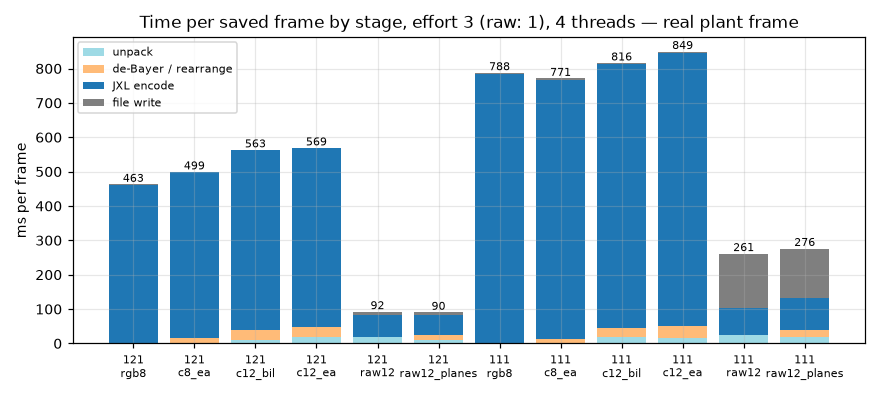
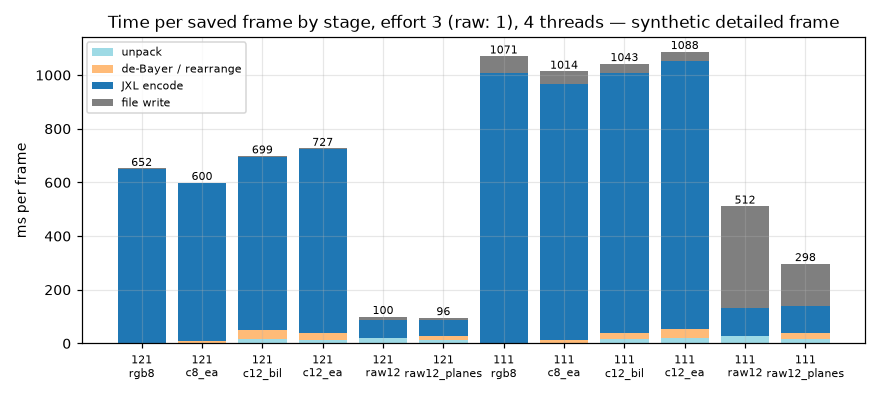
Figure B1. Time per saved frame (ms) split by step: (a, top) each tower's own real frame; (b, bottom) the synthetic frame (a computer-generated "dead leaves" texture of overlapping discs with added noise [1], harder to compress than any real scene). Effort 3 (raw lossless: effort 1), 4 threads, distance 1.0.
Table B1. Total time per saved frame (ms) on each tower's own real frame and on the synthetic frame, effort 3, 4 threads, distance 1.0 (raw lossless: effort 1). The real frames differ between towers, so Table 14 is the fair comparison.
| Path | IOTA, own frame (ms) | IOTA, synthetic (ms) | Delta, own frame (ms) | Delta, synthetic (ms) |
|---|---|---|---|---|
| Today: camera RGB8 | 463 | 652 | 788 | 1071 |
| Raw 12-bit → colour (edge-aware) | 569 | 727 | 849 | 1088 |
| Raw 12-bit planes, lossless | 90 | 96 | 276 | 298 |
The camera's real RGB8 files on these frames were 3.7–4.0 MB. The results agree with the shared-frame comparison (Section 3.5).