 pgdalmeida
032355e8fb 
|
||
|---|---|---|
| .claude | ||
| cmake | ||
| config | ||
| docs | ||
| hardware | ||
| include/fgc | ||
| scripts | ||
| src | ||
| tests | ||
| tools | ||
| .deploy.env.example | ||
| .gitignore | ||
| CMakeLists.txt | ||
| README.md | ||
| deploy.sh | ||
| ini.c | ||
| ini.h | ||
| main.cpp | ||
README.md
Fire Gimbal Control
The program that runs a fire-watch tower. It points a camera around the horizon on a motorised gimbal, keeps one well-exposed picture at every stop, saves it, and tells the ground station about it - all day, unattended, on a small PC at the top of a mast.
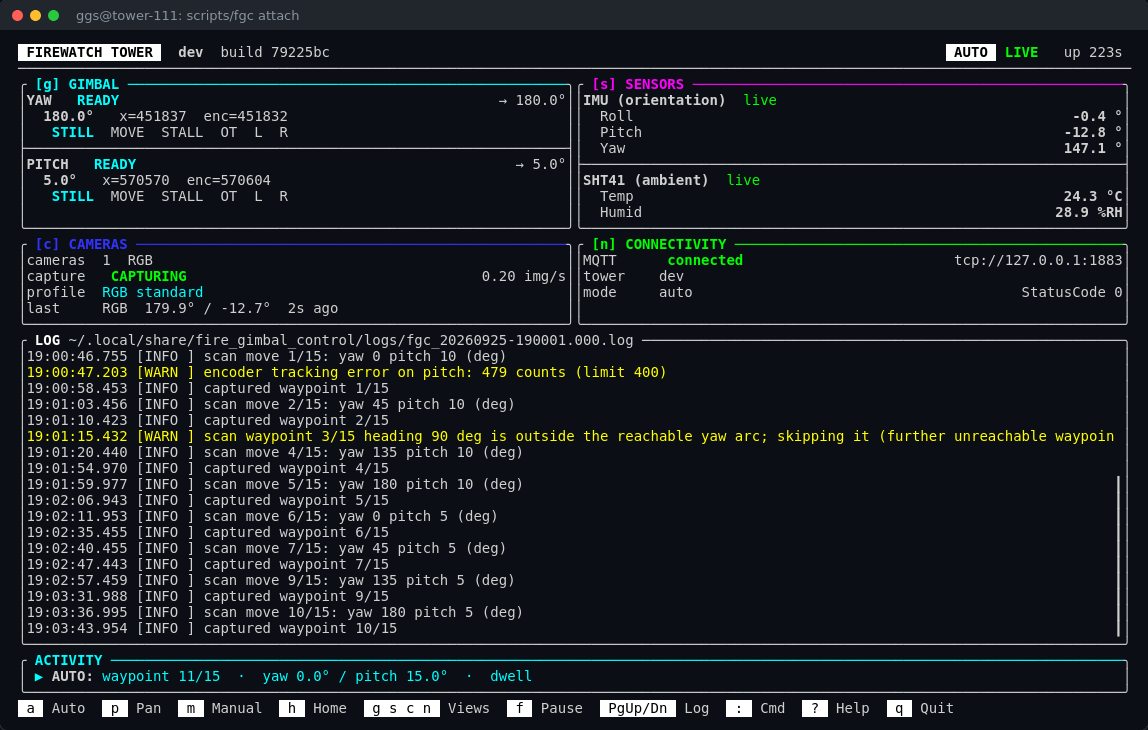 The dashboard of tower 111, captured live on 2026-09-25, seven minutes
after a restart: both axes homed and ready, the camera mid-sweep at waypoint 6
of 15, the orientation and ambient sensors reporting, and every picture
announced to the broker.
Contents
- What it does
- How the pieces fit together
- A scan, step by step
- Running a tower
- The dashboard
- The plain console
- Everyday commands
- Is the tower healthy?
- Setting up and updating a tower
- For developers
- Documentation
What it does
A fire-watch tower is a mast with a camera on a gimbal - a mount with two
motors, one turning left and right (yaw), one tilting up and down
(pitch). This program, fire_gimbal_control, runs on the tower's
LattePanda PC and does the watching:
- Sweeps a scan grid. A list of directions - "0 deg, 10 deg up", "45 deg, 10 deg up", and so on - that together cover the view. Tower 111's grid has 15 stops.
- Keeps one good picture per stop. The camera runs continuously with its own auto-exposure; when the gimbal has stopped and settled, the newest frame is kept.
- Saves it as JPEG XL, a compact modern image format, one file per picture.
- Tells the ground station over MQTT - which camera, which direction, and when - so the picture can be fetched and checked for smoke.
It does this unattended: it starts at boot, homes the gimbal, and sweeps until it is told to stop. A person only needs to look in when something is wrong - and the dashboard, the log and the self-tests are there to show what.
How the pieces fit together
Two programs cooperate, on two different chips:
| The firmware | The host program (this repository) | |
|---|---|---|
| Runs on | the small motor board (an RP2040 on the newer IOTA towers, an ATmega32U4 "Leonardo" on the older Delta ones) | the LattePanda PC |
| Lives in | its own repository, GGS/fwt_firmware on the same git server, checked out beside this one as ../firmware |
here |
| Its job | the muscles and reflexes: drive the two stepper-motor drivers, find the endstops, hold a position, stop the moment something is wrong | the brain: decide where to point and when to take a picture, own every setting, run the camera, talk to the ground station |
The firmware keeps no settings of its own. Every number that describes the
motors - the currents, the speeds, the travel, how a stall is detected - lives
on the PC, in a file called hardware.ini, and the program hands it to the
firmware each time they connect. Until it has them, the firmware refuses to
move - a motor running on guessed values can cook its driver or push the
gimbal through its endstop, and both have happened on this project.
flowchart LR
    HW["hardware.ini<br/>what the tower IS"] --> APP
    CFG["config.ini<br/>what the tower DOES"] --> APP
    APP["fire_gimbal_control<br/>on the LattePanda"] -- "USB serial<br/>commands + settings" --> MCU["motor board<br/>firmware"]
    MCU -- "status, 4x a second" --> APP
    MCU -- SPI --> DRV["TMC5160<br/>stepper drivers"] --> MOT["yaw + pitch<br/>motors"]
    CAM["camera<br/>(USB3)"] -- frames --> APP
    APP --> JXL["pictures<br/>.jxl files"]
    APP -- MQTT --> BROKER["broker on the tower"] --> GS["ground station"]
The two files
Everything that makes one tower different from another is in two files:
| File | Where | What goes in it | Who writes it |
|---|---|---|---|
hardware.ini |
/etc/fire_gimbal_control/ |
What the tower IS - the board, which axes and sensors are fitted, how the motor board is wired, each motor's currents, travel and speeds, the camera's id | the installer, once; a person when the hardware changes |
config.ini |
~/.config/fire_gimbal_control/, with the scan grid and camera profiles |
What the tower DOES - its name, the scan grid, capture settings, the broker, logging, and calibration such as which way is north | the installer (a first copy), the calibration commands, a person |
Where both set the same thing, hardware.ini wins, and the program says so at
start-up. Full reference: docs/configuration.md and
config/hardware.example.ini.
How they start talking
Every time the program connects to the motor board - at boot, after a restart, after the firmware is updated - they go through the same short conversation:
sequenceDiagram
    participant F as Firmware (motor board)
    participant H as fire_gimbal_control (PC)
    Note over F: power-up: stop both drivers,<br/>refuse HOME / MOVE
    F->>H: BOOT build=...
    F->>H: NEED Y steps_per_rev run_irun ... (what it is missing)
    H->>F: SET Y steps_per_rev 177000
    H->>F: SET Y ... (every value, from hardware.ini)
    Note over F: all values in: axis ready to home
    H->>F: DUMP
    F->>H: DUMP ... (every value it now holds, and the pins it was built with)
    Note over H: compare with hardware.ini<br/>(this is `test hardware motor`)
    H->>F: HOME
    F->>H: ST Y:A,... P:A,...  (both axes READY)
So a tower is re-tuned by editing hardware.ini and restarting the program -
no firmware update needed. Only the wiring (which pin drives which driver)
is built into the firmware, and even that is read from the tower's own
hardware.ini when the firmware is built.
A scan, step by step
flowchart TD
    A([next waypoint]) --> B["move yaw and pitch<br/>to the waypoint"]
    B --> C{"both axes<br/>stopped?"}
    C -- no --> C
    C -- yes --> D["hold still for settle_wait_ms<br/>(and, with settle_rule = brightness,<br/>until the brightness has settled)"]
    D --> W["wait out what is left of<br/>image_interval since the last picture"]
    W --> E["keep the newest frame<br/>the camera delivered"]
    E --> F["encode to JPEG XL<br/>save to the output folder"]
    F --> G["publish a CamEvent<br/>(camera, heading, pitch, time)"]
    G --> A
The camera never stops running. It free-runs at its profile's frame rate with its own auto-exposure following the light, and almost every frame is thrown away - their job is to keep the exposure right, so that the one frame kept at each stop is already correctly exposed and was taken with the gimbal at rest.
Which frame rate and exposure limits apply comes from a camera profile: a
settings file exported from the camera itself. standard is for daylight,
night for low light; switch with set camera profile night.
Running a tower
On a tower the program runs detached, inside tmux, so it keeps running
when you close your ssh session. scripts/fgc does that for you:
scripts/fgc start                  # start it; config.ini [Startup] says whether it homes and sweeps
scripts/fgc attach                 # open the dashboard (Ctrl-b d to leave it running)
scripts/fgc status                 # is it running? since when? which PID?
scripts/fgc peek                   # a text snapshot of the dashboard, without attaching
scripts/fgc stop                   # a clean shutdown - camera and motors stopped properly
scripts/fgc restart                # stop, then start again
Tip - detach, don't quit. Inside the dashboard,
Ctrl-b dleaves the program running. The dashboard's ownqasks whether you want to quit the program or background it; background does the same asCtrl-b d.
At boot, a tower with the boot service starts itself the same way - through
fgc, so the dashboard is still there to attach to:
sudo systemctl status fire-gimbal-control     # is the service running?
sudo systemctl restart fire-gimbal-control    # restart it (it homes the gimbal again)
What the program does as it starts is set in config.ini, not by flags:
[Startup]
home = true     ; home the gimbal at every start
mode = auto     ; manual (wait for someone) or auto (sweep at once)
home = true is what a tower in service needs: the motor board forgets its
position whenever it loses power. Tower 111 homes and starts in auto, so after
a power cut it is back to capturing within about a minute, with nobody touching
it. A new tower starts with mode = manual until it is proven. See
configuration.md.
Only one copy can run at a time. Two would fight over the motor board and the camera, so a second one refuses to start and says which process holds the lock. After a crash or a power cut there is nothing to clean up.
The log is kept per run in
~/.local/share/fire_gimbal_control/logs/fgc_<date>-<time>.<n>.log, more
detailed than what the dashboard shows:
tail -F "$(ls -t ~/.local/share/fire_gimbal_control/logs/fgc_*.log | head -1)"
More in docs/deployment.md.
The dashboard
The dashboard (the "TUI", for terminal user interface) is what scripts/fgc attach opens. It updates live, and everything on it is read-only unless you
press a key that acts.
| Panel | What it shows |
|---|---|
| Header | the tower's name, the program's build, its mode (AUTO, PAN, MANUAL), LIVE (or PAUSED), how long it has been up |
GIMBAL g |
each axis: its state (READY, HOMING, ERROR...), the angle it is at and the one it is heading for, the motor and encoder counts, and flags - STILL/MOVE, STALL, over-temperature OT, endstops L/R |
SENSORS s |
the orientation sensor (IMU) (roll, pitch, yaw) and the ambient temperature and humidity, each marked live or not |
CAMERAS c |
whether it is capturing and how fast, the active profile, and the last picture: which camera, where it pointed, how long ago |
CONNECTIVITY n |
the broker connection, the tower name the messages carry, the mode as published |
| LOG | the latest log lines, and in its title the file they are written to; warnings in yellow, errors in red. It always shows the newest line - pause (f) to page back |
| ACTIVITY | what is running right now (a sweep, a pan, a homing, a test, a heading setup) and the result of the last one |
| Key bar | the keys that do something in this view |
Keys
| Key | Does |
|---|---|
a / p / m |
auto mode (sweep the scan grid) / pan 30° around where the gimbal points now / manual mode (stop, take it by hand) |
h |
home the gimbal |
g s c n |
open the full-screen gimbal, sensors, cameras or connectivity view; press it again to close |
? |
the built-in help: every command on one page (:help <topic> for examples) |
: |
type a command, exactly as in the command list |
f |
freeze the display, to select and copy text or to page back through the log (the program keeps running) |
PgUp PgDn |
scroll the log, or the open view - the only scroll keys |
| arrows | nudge the gimbal by hand, from any view - manual mode only (up/down only on a tower with pitch) |
Space |
take one picture now (snapshot) - manual mode only |
r |
continuous capture on/off (capture on / capture off) - manual mode only |
Esc |
close a view; with no view open, cancel whatever is running (a test, a homing, a calibration, a heading setup) |
q |
quit or background the program - it asks which |
Ctrl-b d |
leave the dashboard and keep the program running (a tmux key) |
The full-screen views
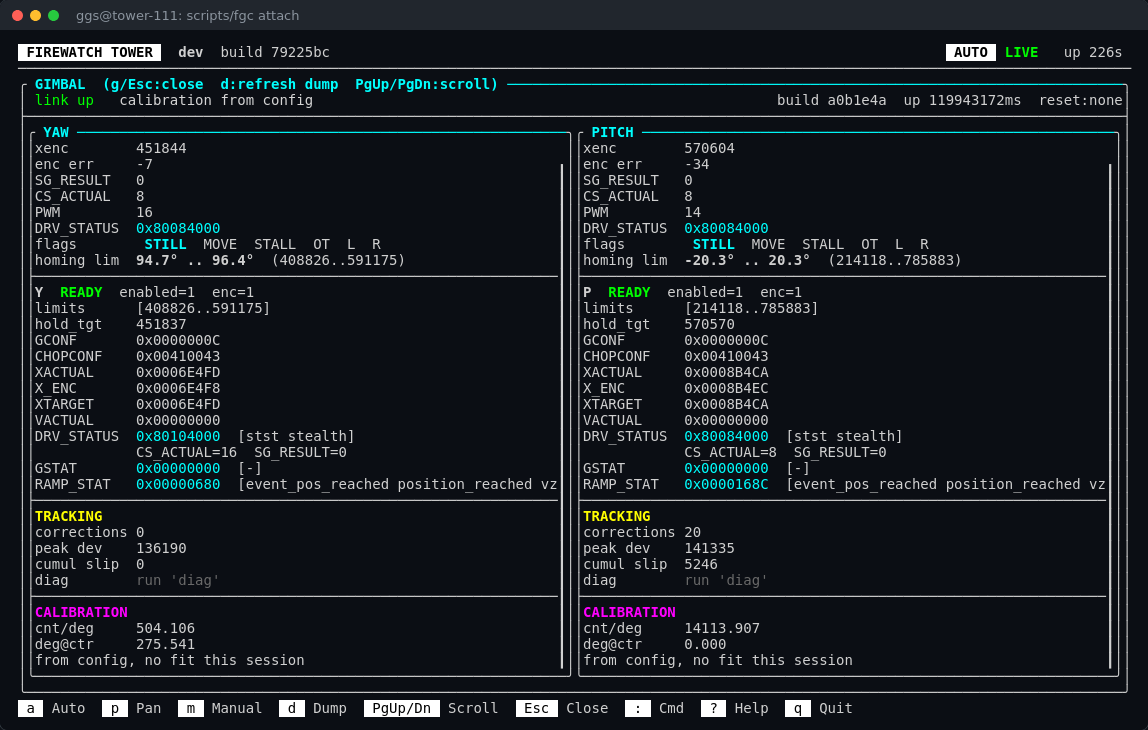
Gimbal (g) - both axes in detail: positions, the motor driver's live
registers decoded into words, how well the encoder is tracking, the homed
limits and the calibration. The first time it opens it asks the firmware for a
full dump; d refreshes it.
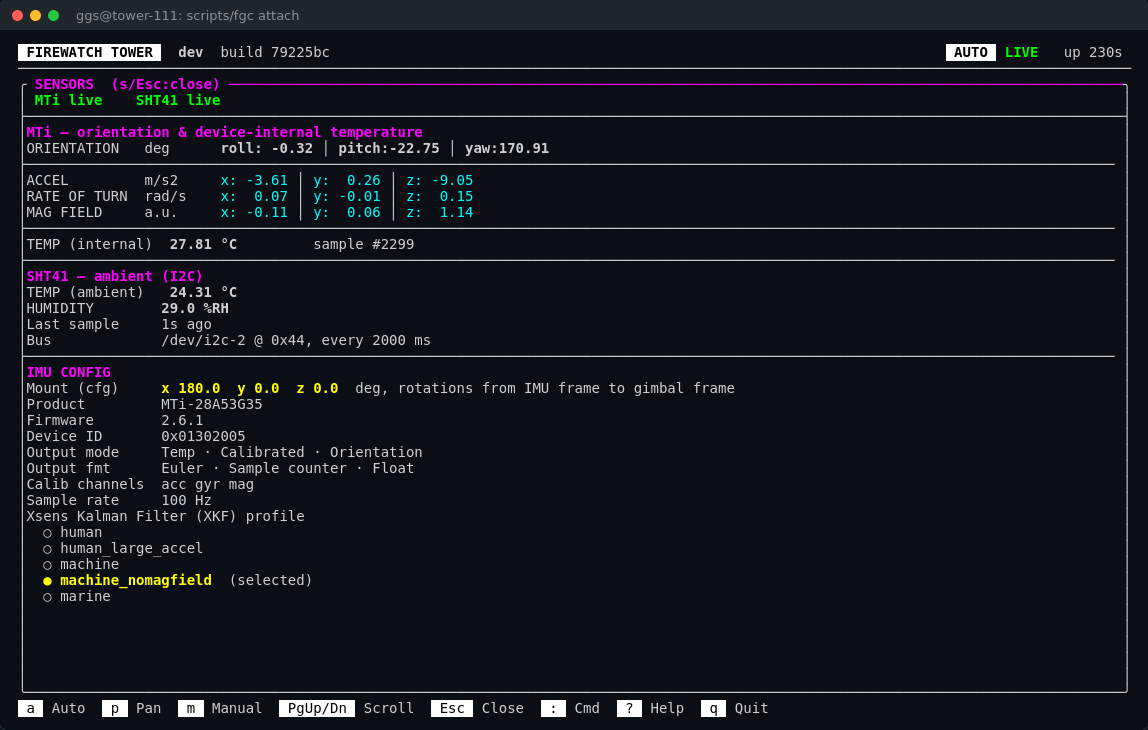
Sensors (s) - the orientation sensor's (IMU's) full output (acceleration, turn
rate, magnetic field, its internal temperature) and configuration, and the
ambient sensor with the bus it is on.
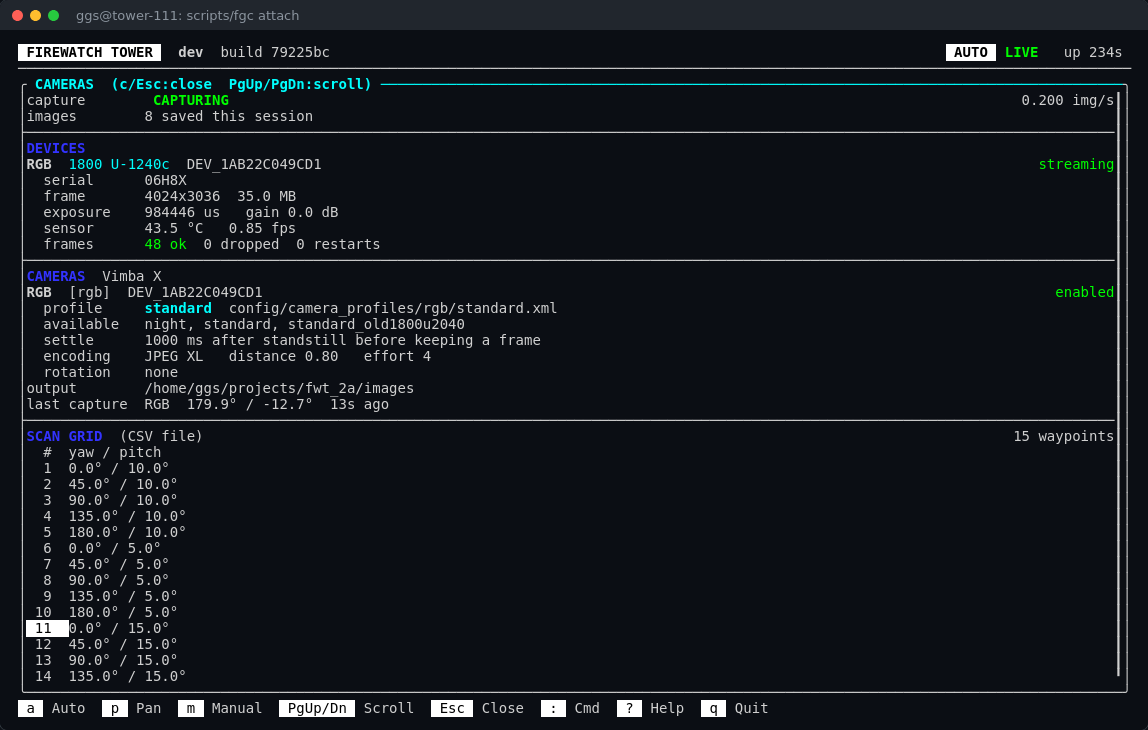
Cameras (c) - the camera itself (model, frame size, exposure, gain,
temperature, frames delivered and dropped, stream restarts), its profile and
encoding, and the whole scan grid with the current waypoint marked.
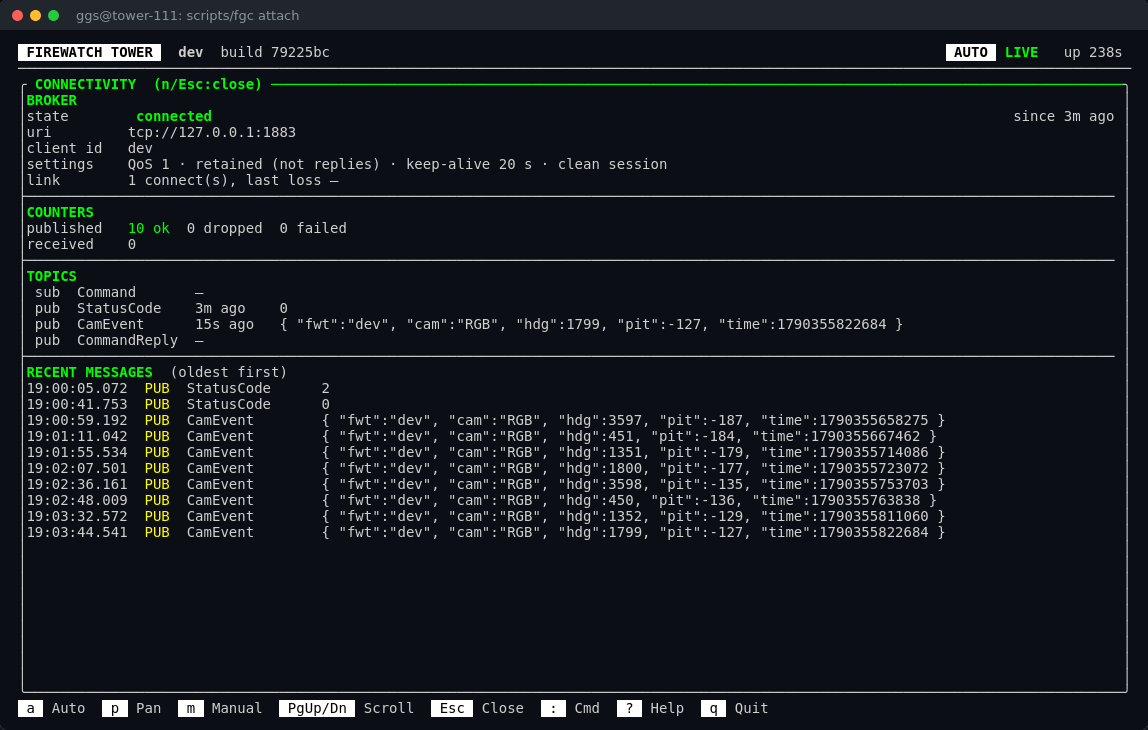
Connectivity (n) - the broker connection, message counters, the topics
the tower listens and speaks on, and the most recent messages, exactly as sent.
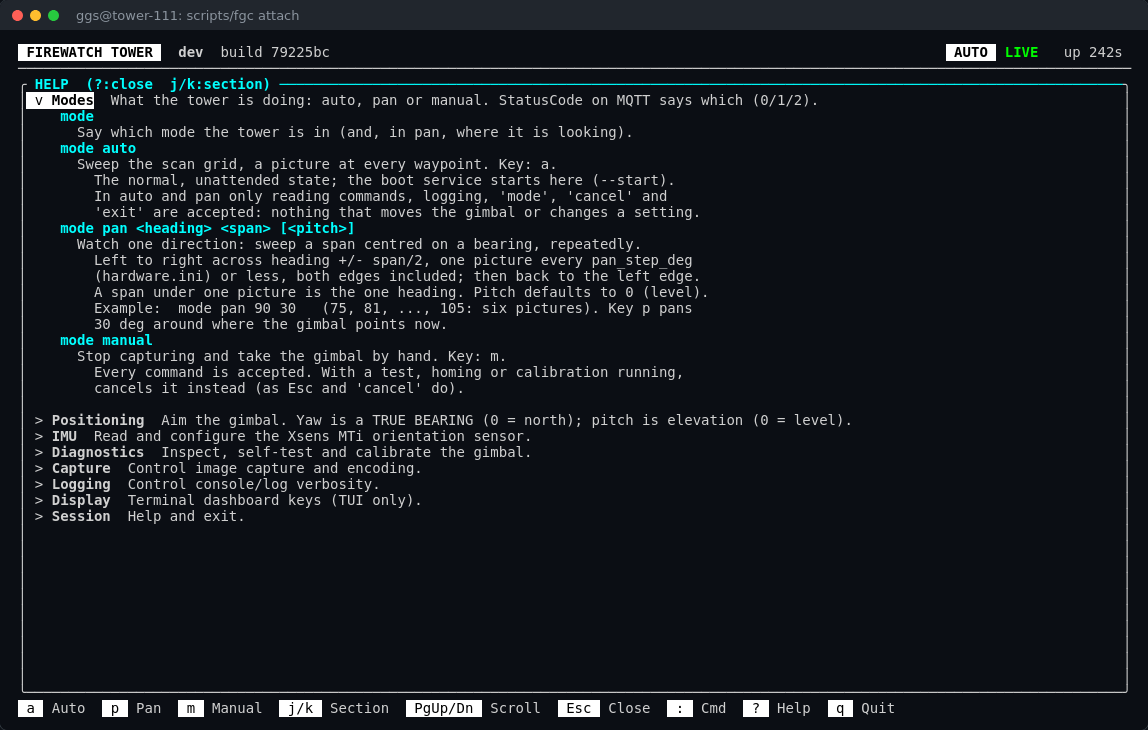
Help (?) - every command, grouped, with an explanation and an example.
The same text is available anywhere as help or help <topic>.
The plain console
Without the dashboard, the program prints its log lines to the terminal and
reads commands from the keyboard, one per line. That is what you get with
--no-tui, with [UI] enable_tui = false in config.ini, or whenever the
output goes somewhere that is not a terminal - a pipe, a file, a script.
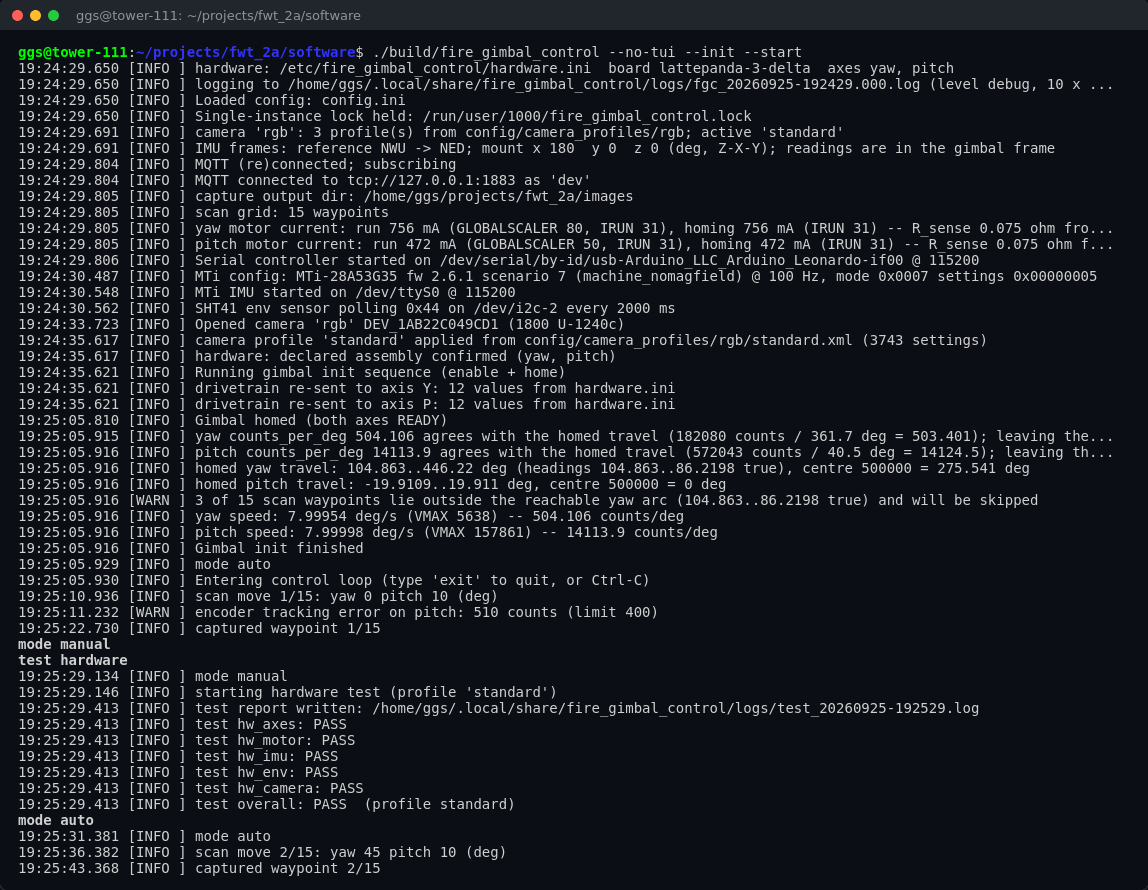 Tower 111 on 2026-09-25, run by hand. It loads its settings, opens the
motor board, the sensors and the camera, hands the firmware its settings, homes,
and starts sweeping in auto mode. The typed commands (in bold) switch it to
manual, run
test hardware, and put it back in auto. Two firmware register
dumps, dozens of wide lines each, are left out.
Type any command from the list below and press Enter;
exit (or Ctrl-D) stops the program cleanly. Nothing here needs a mouse or a
large window, which makes it the easiest way to run the program by hand while
bringing a tower up.
For scripts, --test runs one self-test and exits with its verdict:
./build/fire_gimbal_control --no-mqtt --test hardware
echo $?        # 0 = PASS, 4 = FAIL, 5 = could not start (the log says why)
Everyday commands
A tower is always in one of three modes. In auto it sweeps its scan
grid by itself - the normal state, and where it starts at boot. In pan it
watches one direction: mode pan 90 30 sweeps 75° to 105°, a picture every
6°, over and over. In manual it does nothing by itself and a person drives
it. Auto and pan refuse anything that would move the gimbal or change a
setting, so mode manual comes first; the tower publishes its mode on MQTT
(StatusCode: 0 auto, 1 pan, 2 manual).
The same commands work at the : prompt in the dashboard, in the plain
console, and over MQTT: a web maintenance interface can send any of them on
GGS/FWT/<tower>/Command and read the answer on CommandReply - the lines the
command logged, and whether it succeeded. That topic is always live and
withholds nothing (exit included), so who may publish to it is the broker's
job. Details, payloads and safety rules: docs/mqtt-api.md.
| Command | Does |
|---|---|
mode auto / mode manual |
sweep the scan grid / stop and take the gimbal by hand (it stays homed and powered) |
mode pan <heading> <span> [<pitch>] |
watch one direction: mode pan 90 30 covers 75°-105°, a picture every 6° |
gimbal home |
find the endstops and centre - needed after every power-up |
gimbal move <yaw>[,<pitch>] |
point at a true bearing (0 = north) and an elevation, in degrees; without a pitch only yaw moves. A yaw-only tower ignores the pitch and refuses pitch-only commands |
gimbal nudge <yaw|pitch> <+/-percent> |
a small move by hand |
snapshot |
take one picture now (manual mode) |
capture on / capture off |
keep taking pictures where the gimbal is aimed, at the sweep's pace (manual mode; the gimbal can still be nudged) |
test [<subsystem> [<test>]] |
run self-tests - see below |
gimbal heading setup |
tie the yaw axis to true north by sighting landmarks |
set camera profile <name> |
switch the camera profile, e.g. night |
camera reset |
reboot the camera and put it back on its profile - for a camera that has stopped sending pictures |
gimbal dump |
show everything the firmware is holding |
debug |
more detail in the log, or back to normal |
trace <serial|mqtt|camera|control|all|off> |
log every message to and from a part, word for word |
help [<topic>] |
the full list, with examples |
exit |
stop everything and quit |
The complete list, with every option, is in the built-in help and in
docs/configuration.md.
Is the tower healthy?
One command checks almost everything, and changes nothing:
scripts/install-tower --verify
== verify ==
  ok    usbfs_memory_mb        1000 (want >= 1000)
  ok    camera USB3 LPM        0 (want 0)
  ok    config files load      cleanly, 0 shadowed key(s)
  ok    hardware.ini complete  0 TODO(s)
  ok    firmware pins          running build=a0b1e4a ...; declared ... Y=8,7 P=1,0
  ok    test hardware          PASS
  ok    test camera            PASS
  ok    boot service           enabled
  ok    user lingering         yes

>> all checks pass
Tower 111, 2026-09-24.
If the program is running, the tests run inside it - the sweep pauses for a few seconds and carries on afterwards. The two tests that matter most:
-
test hardware- is this the towerhardware.inidescribes? The declared axes answer, the firmware holds exactly the declared settings and was built for the declared wiring, the orientation and ambient sensors (if fitted) are really there, the camera opened, and the USB settings the camera needs are in place. -
test camera- does the camera work, whatever it is looking at? It never judges the picture - fog, night or a lens cap would all make a bad picture out of a healthy camera. Instead it uses the camera's own settings:- frames - whole pictures arrive, in time;
- dark - at the shortest exposure and lowest gain, every pixel goes black;
- bright - at the highest gain and a long exposure, the picture becomes clearly different from the dark one. That can only happen if the sensor is alive and took the settings.
Afterwards the camera goes back on its profile.
A test that could not run - no ambient sensor fitted, say - says not
checked, never PASS. Every run is written to
~/.local/share/fire_gimbal_control/logs/test_*.log and compared with the one
before. More: docs/test-command.md.
Other test groups need a homed gimbal and move it: test gimbal (homing
repeatability, encoder, friction, backlash, balance) and test imu. test host
checks the PC itself (temperature, disk, memory, load).
Setting up and updating a tower
A new tower - or one set up before any of this existed - is installed by one script, run on the tower:
scripts/install-tower --dry-run   # look, ask, show the plan; change nothing
scripts/install-tower             # the same, then do it after one "yes"
It installs the packages and USB settings, the camera SDK, builds this program
and the firmware, writes the two files (asking only what it cannot find out
for itself), flashes the firmware, runs the tests, and sets up the boot
service. It never guesses a motor value: anything nobody has measured is
written as a ; TODO, and the firmware is not flashed until it is filled in.
It only homes the gimbal after someone says they are standing at it. Re-running
it on a working tower is safe; it changes only what is out of date. The whole
story: docs/tower-installation.md.
Updating is done from a development machine, with each repository's
deploy.sh, and always in this order:
- this program first -
./deploy.shhere copies the code to the tower and builds it there; restart it to use the new version; - the firmware second -
./deploy.shin the firmware repository builds it on the tower and flashes the motor board.
Host first, because a new firmware asks for its settings the moment it starts, and an older program would not know how to answer. Details: docs/deployment.md.
For developers
The shape of the code
The program is a core that needs no hardware or proprietary SDKs, plus a real and a stand-in version of each part that touches the outside world. That is what lets the whole thing run on any Linux machine, with nothing attached.
flowchart TB
    core["fgc_core - no hardware, no SDKs<br/>Config · CaptureScheduler · TestRunner<br/>parsers for telemetry, DUMP and commands"]
    core --> I1[IMotorController] & I2[IControlChannel] & I3[ICameraSource]
    I1 --> R1[SerialMotorController] & M1[MockMotorController]
    I2 --> R2[MqttControlChannel] & M2[NullControlChannel]
    I3 --> R3["VimbaCameraSource<br/>(Allied Vision Vimba X)"] & M3[MockCameraSource]
    R3 --> P[ImagePipeline] --> J[".jxl files + CamEvent"]
Real on the left of each pair, stand-in on the right. There are stand-ins for the orientation and ambient sensors too. The full design is in docs/architecture.md.
Build
cmake -B build                                # full build: needs Vimba X, fetches Paho MQTT
cmake --build build -j"$(nproc)"             # -> build/fire_gimbal_control, build/fgc-config

cmake -B build -DWITH_VIMBA=OFF -DWITH_MQTT=OFF   # no proprietary SDKs: stand-ins only
Dependencies (OpenCV, Boost, libjxl, the Vimba X SDK) are in docs/build-and-setup.md.
Run with nothing attached
./build/fire_gimbal_control --mock-serial --mock-camera --no-mqtt --tui
The stand-in motor board, camera and broker behave like the real ones closely
enough to drive the dashboard, run a sweep and run most self-tests.
[Features] mock_needcfg = true makes the stand-in motor board ask for its
settings the way the real firmware does.
Command-line options
| Flag | Effect |
|---|---|
-c, --config <path> |
use this config.ini (otherwise $FGC_CONFIG, then ~/.config/fire_gimbal_control/config.ini, then ./config.ini, ...) |
--hardware <path> |
use this hardware.ini (otherwise $FGC_HARDWARE, then /etc/fire_gimbal_control/hardware.ini, then beside config.ini) |
--test <selection> |
run one self-test and exit: 0 PASS, 4 FAIL, 5 could not start |
--tui / --no-tui |
the dashboard / the plain console (overrides [UI] enable_tui) |
--mock-serial, --mock-camera, --mock-env |
stand-ins instead of the motor board, camera, ambient sensor |
--no-mqtt |
no broker |
--degraded |
start even though hardware.ini declares a part that is missing (field triage) |
--log-level <level> |
trace, debug, info, warn, error, off - for the screen |
--log-file-level <level>, --no-log-file |
the log file's level / no log file this run |
--trace <parts> |
log every message to and from serial, mqtt, camera, control, all |
--no-lock, --lock-file <path> |
skip / move the single-instance lock (development only) |
-h, --help |
all of the above |
Watching the wires
Two separate knobs control what is logged:
- the level (
--log-level,debug,[Logging] level) - how much ordinary detail. Atinfo, a running sweep is nearly silent; - traces (
--trace,trace <part>,[Logging] trace) - every single message exchanged with a part, word for word, whatever the level. Off by default; the camera one is busy.
14:02:01.234 [SERIAL]  TX MOVE -90,0
14:02:01.250 [SERIAL]  RX ST Y:A,982,969,80084000,0,8,8,Se P:A,...
14:02:02.000 [MQTT]    PUB GGS/FWT/Tower/StatusCode 0
14:02:02.500 [CAMERA]  TX trigger cam0
14:02:02.910 [CAMERA]  RX frame cam0 1936x1216 7064576B
Tests
cmake -B build-test -DWITH_VIMBA=OFF -DWITH_MQTT=OFF -DBUILD_TESTING=ON
cmake --build build-test -j"$(nproc)"
ctest --test-dir build-test --output-on-failure
Over 360 unit tests, needing no hardware and no SDKs: configuration and the two files, the parsers, the capture scheduler, the self-test checks against the stand-ins, the firmware handshake, the camera checks, the config-file editor.
Repository layout
CMakeLists.txt        build (WITH_VIMBA, WITH_MQTT, WITH_TUI, BUILD_TESTING)
main.cpp              entry point: command line -> Application
include/fgc/          headers: the interfaces, config, scheduler, tests, ...
  mock/               the stand-in implementations
src/
  core/               the core: Application, config, scheduler, parsers, tests, ...
  camera/             Vimba X camera, image pipeline, JPEG XL encoder
  serial/             motor board and orientation-sensor links
  mqtt/               MQTT control channel
  sensors/            ambient sensor (SHT41) over I2C
  ui/                 the dashboard and the plain console
tests/                unit tests (doctest)
tools/fgc_config.cpp  fgc-config: edits config.ini / hardware.ini safely
config/               config.example.ini, hardware.example.ini, scan grids, camera profiles
hardware/             per-board setup kits (LattePanda IOTA, LattePanda 3 Delta)
scripts/              fgc, install-tower, the boot service, camera-profile export
docs/                 everything longer than a README
ini.c, ini.h          the bundled INI parser (inih)
Documentation
| Document | Read it for |
|---|---|
| docs/tower-installation.md | installing a tower, step by step, and what each step is for |
| docs/deployment.md | running and updating a tower: deploy.sh, fgc, the boot service, the log, troubleshooting |
| docs/configuration.md | every key in config.ini, every flag, every command |
| docs/test-command.md | the self-tests: groups, profiles, reports, baselines |
| docs/mqtt-api.md | the MQTT topics and what each message contains |
| docs/known-issues.md | what is known to be wrong or unfinished |
| docs/architecture.md | the design: parts, threads, data flow, the capture cycle |
| docs/modules-reference.md | file by file |
| docs/build-and-setup.md | building, dependencies, the camera SDK |
| docs/hardware-config-plan.md | why hardware.ini exists, and the firmware handshake |
| docs/hardware-porting-plan.md | moving towers to the LattePanda IOTA |
| docs/lattepanda-iota.md | the IOTA board |
| docs/roadmap.md, docs/test-roadmap.md | what comes next |
Ownership
Internal tooling for the GGS fire-watch tower network. No license file is present in the repository.