# Fire Gimbal Control
**The program that runs a fire-watch tower.** It points a camera around the
horizon on a motorised gimbal, keeps one well-exposed picture at every stop,
saves it, and tells the ground station about it - all day, unattended, on a
small PC at the top of a mast.
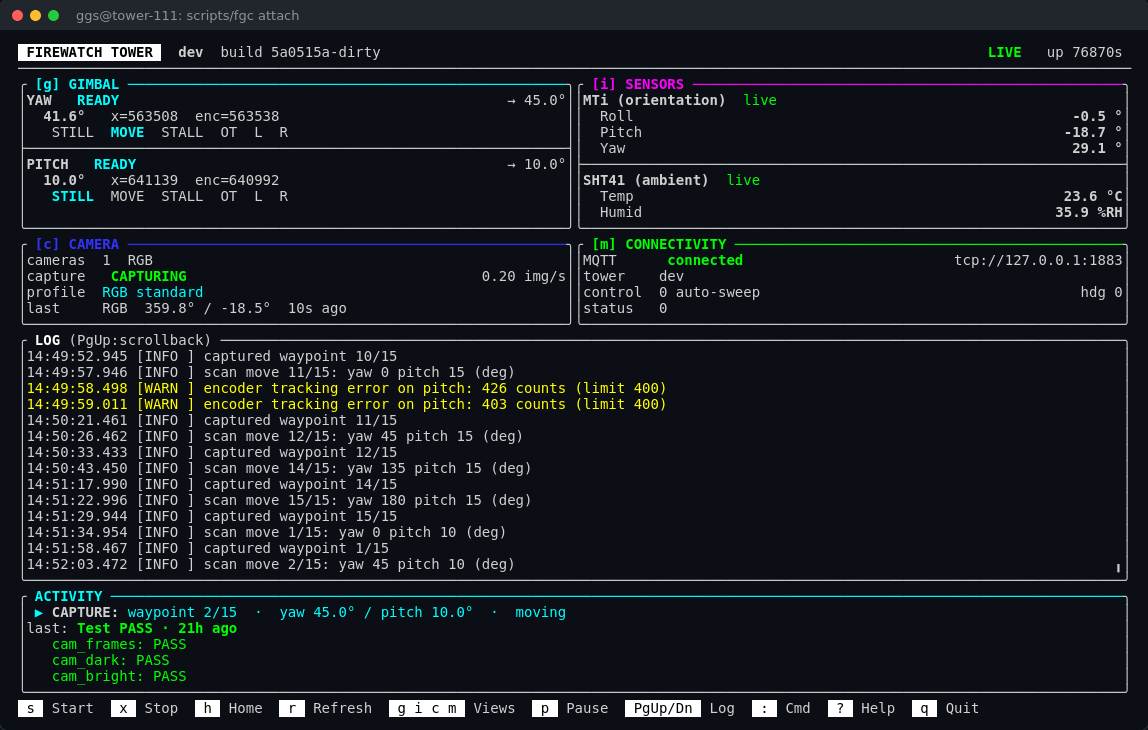
The dashboard of tower 111, captured live on 2026-09-25: both axes homed
and ready, the camera mid-sweep at waypoint 2 of 15, the orientation and
ambient sensors reporting, messages flowing to the broker, and the last
self-test green.
---
## Contents
- [What it does](#what-it-does)
- [How the pieces fit together](#how-the-pieces-fit-together)
- [A scan, step by step](#a-scan-step-by-step)
- [Running a tower](#running-a-tower)
- [The dashboard](#the-dashboard)
- [The plain console](#the-plain-console)
- [Everyday commands](#everyday-commands)
- [Is the tower healthy?](#is-the-tower-healthy)
- [Setting up and updating a tower](#setting-up-and-updating-a-tower)
- [For developers](#for-developers)
- [Documentation](#documentation)
---
## What it does
A fire-watch tower is a mast with a camera on a **gimbal** - a mount with two
motors, one turning left and right (**yaw**), one tilting up and down
(**pitch**). This program, `fire_gimbal_control`, runs on the tower's
LattePanda PC and does the watching:
1. **Sweeps a scan grid.** A list of directions - "0 deg, 10 deg up", "45 deg,
10 deg up", and so on - that together cover the view. Tower 111's grid has
15 stops.
2. **Keeps one good picture per stop.** The camera runs continuously with its
own auto-exposure; when the gimbal has stopped and settled, the newest frame
is kept.
3. **Saves it as JPEG XL**, a compact modern image format, one file per picture.
4. **Tells the ground station** over MQTT - which camera, which direction, and
when - so the picture can be fetched and checked for smoke.
It does this unattended: it starts at boot, homes the gimbal, and sweeps until
it is told to stop. A person only needs to look in when something is wrong -
and the dashboard, the log and the self-tests are there to show what.
---
## How the pieces fit together
Two programs cooperate, on two different chips:
| | The **firmware** | The **host program** (this repository) |
|---|---|---|
| Runs on | the small motor board (an RP2040 on the newer IOTA towers, an ATmega32U4 "Leonardo" on the older Delta ones) | the LattePanda PC |
| Lives in | its own repository, `GGS/fwt_firmware` on the same git server, checked out beside this one as `../firmware` | here |
| Its job | the **muscles and reflexes**: drive the two stepper-motor drivers, find the endstops, hold a position, stop the moment something is wrong | the **brain**: decide where to point and when to take a picture, own every setting, run the camera, talk to the ground station |
The firmware keeps **no settings of its own**. Every number that describes the
motors - the currents, the speeds, the travel, how a stall is detected - lives
on the PC, in a file called `hardware.ini`, and the program hands it to the
firmware each time they connect. Until it has them, the firmware **refuses to
move** - a motor running on guessed values can cook its driver or push the
gimbal through its endstop, and both have happened on this project.
```mermaid
flowchart LR
HW["hardware.ini what the tower IS"] --> APP
CFG["config.ini what the tower DOES"] --> APP
APP["fire_gimbal_control on the LattePanda"] -- "USB serial commands + settings" --> MCU["motor board firmware"]
MCU -- "status, 4x a second" --> APP
MCU -- SPI --> DRV["TMC5160 stepper drivers"] --> MOT["yaw + pitch motors"]
CAM["camera (USB3)"] -- frames --> APP
APP --> JXL["pictures .jxl files"]
APP -- MQTT --> BROKER["broker on the tower"] --> GS["ground station"]
```
### The two files
Everything that makes one tower different from another is in two files:
| File | Where | What goes in it | Who writes it |
|---|---|---|---|
| `hardware.ini` | `/etc/fire_gimbal_control/` | **What the tower IS** - the board, which axes and sensors are fitted, how the motor board is wired, each motor's currents, travel and speeds, the camera's id | the installer, once; a person when the hardware changes |
| `config.ini` | beside the program | **What the tower DOES** - its name, the scan grid, capture settings, the broker, logging, and calibration such as which way is north | the installer (a first copy), the calibration commands, a person |
Where both set the same thing, `hardware.ini` wins, and the program says so at
start-up. Full reference: [docs/configuration.md](docs/configuration.md) and
[config/hardware.example.ini](config/hardware.example.ini).
### How they start talking
Every time the program connects to the motor board - at boot, after a restart,
after the firmware is updated - they go through the same short conversation:
```mermaid
sequenceDiagram
participant F as Firmware (motor board)
participant H as fire_gimbal_control (PC)
Note over F: power-up: stop both drivers, refuse HOME / MOVE
F->>H: BOOT build=...
F->>H: NEED Y steps_per_rev run_irun ... (what it is missing)
H->>F: SET Y steps_per_rev 177000
H->>F: SET Y ... (every value, from hardware.ini)
Note over F: all values in: axis ready to home
H->>F: DUMP
F->>H: DUMP ... (every value it now holds, and the pins it was built with)
Note over H: compare with hardware.ini (this is `test hardware motor`)
H->>F: HOME
F->>H: ST Y:A,... P:A,... (both axes READY)
```
So a tower is re-tuned by **editing `hardware.ini` and restarting the program** -
no firmware update needed. Only the **wiring** (which pin drives which driver)
is built into the firmware, and even that is read from the tower's own
`hardware.ini` when the firmware is built.
---
## A scan, step by step
```mermaid
flowchart TD
A([next waypoint]) --> B["move yaw and pitch to the waypoint"]
B --> C{"both axes stopped?"}
C -- no --> C
C -- yes --> D["hold still for settle_wait_ms (1 s by day, 2.5 s at night)"]
D --> E["keep the newest frame the camera delivered"]
E --> F["encode to JPEG XL save to the output folder"]
F --> G["publish a CamEvent (camera, heading, pitch, time)"]
G --> A
```
The camera never stops running. It free-runs at its profile's frame rate with
its own auto-exposure following the light, and almost every frame is thrown
away - their job is to keep the exposure right, so that the one frame kept at
each stop is already correctly exposed and was taken with the gimbal at rest.
Which frame rate and exposure limits apply comes from a **camera profile**: a
settings file exported from the camera itself. `standard` is for daylight,
`night` for low light; switch with `set camera profile night`.
---
## Running a tower
On a tower the program runs **detached, inside `tmux`**, so it keeps running
when you close your ssh session. `scripts/fgc` does that for you:
```bash
scripts/fgc start --init --start # start it: home the gimbal, then sweep
scripts/fgc attach # open the dashboard (Ctrl-b d to leave it running)
scripts/fgc status # is it running? since when? which PID?
scripts/fgc peek # a text snapshot of the dashboard, without attaching
scripts/fgc stop # a clean shutdown - camera and motors stopped properly
scripts/fgc restart # stop, then start again
```
> **Tip - detach, don't quit.** Inside the dashboard, `Ctrl-b d` leaves the
> program running. The dashboard's own `q` asks whether you want to **quit** the
> program or **background** it; background does the same as `Ctrl-b d`.
**At boot**, a tower with the boot service starts itself the same way - through
`fgc`, so the dashboard is still there to attach to:
```bash
sudo systemctl status fire-gimbal-control # is the service running?
sudo systemctl restart fire-gimbal-control # restart it (it homes the gimbal again)
```
`--init` homes the gimbal at every start, which a tower in service needs: the
motor board forgets its position whenever it loses power. On tower 111 the
service starts it with `--init --start`, so after a power cut it is back to
capturing within about a minute, with nobody touching it.
**Only one copy can run at a time.** Two would fight over the motor board and
the camera, so a second one refuses to start and says which process holds the
lock. After a crash or a power cut there is nothing to clean up.
**The log** is kept per run in
`~/.local/share/fire_gimbal_control/logs/fgc_-